Christmas photo ideas
The best Christmas photos come from the small moments across December, not one posed shot: the first ornament, the empty cookie plate, the faces lit by the tree. Here are 22 ideas, at home and out in the cold, with tips for shooting tree lights on an iPhone.


Around the tree and at home
- Faces lit by the tree At dusk, turn off the lamps and let the tree light the kids’ faces as they look up at it. Brace the phone on something solid.
- Shooting through the branches Hold the phone right behind a branch so the nearest lights blur into soft circles in front of the person.
- The star on top A parent lifts the smallest kid to place the star. Shoot from below so the tree and the reach fill the frame.
- Your selfie in an ornament Pick a big shiny bauble and photograph your reflection in it, tree lights all around.
- Waiting at the top of the stairs Christmas morning, kids in pajamas sitting on the top step before they’re allowed down. Get downstairs first and shoot up.
- The first rip of paper Sit at kid height across from them and shoot a burst as the first present opens. The face matters more than the gift.
- Buried in wrapping paper After the presents, pile the paper over a kid until only the face peeks out.
- The evidence Santa was here The half-eaten cookie, the empty milk glass, a carrot with a bite out of it. Shoot it in the early morning light before anyone tidies.
- Decorating cookies Icing on fingers, sprinkles everywhere. Shoot from above the table, then close on one serious face piping a star.
- Hot cocoa by the window Two hands around a mug with marshmallows, steam rising, frost or rain on the glass behind.
- The stocking row Stockings with names on the mantel, one close-up per person. Add the dog’s if it has one.
- The pet under the tree Cats and dogs love the tree skirt. Get down on the floor, lights off, tree on.
Out and about in December
- At the tree farm Shoot the search, the saw, and the walk back dragging the tree. The struggle is the funny part.
- The tree on the car roof Everyone posing proudly by the car, tree tied on top.
- The light tour in pajamas Kids in the back seat with their faces pressed to the window as you drive past the neighborhood’s best houses.
- Your house at blue hour Every light on, inside and out, in the 20 minutes after sunset while the sky is still deep blue. Shoot from across the street.
- Meeting Santa Stand off to the side, not in front, and catch the kid’s face as they first see him. Tears count too.
- The holiday market Steam from a cup of cider, a stall of ornaments, mittens holding a warm pretzel.
- Ice skating Hold hands with a wobbly skater and shoot from the rail as they come around. Burst helps.
- The first snow If you get snow, shoot a kid catching flakes on their tongue, with a dark coat or trees behind so the flakes show.
- The white elephant reveal Point the camera at the person opening, not the gift. Shoot the second they see what it is.
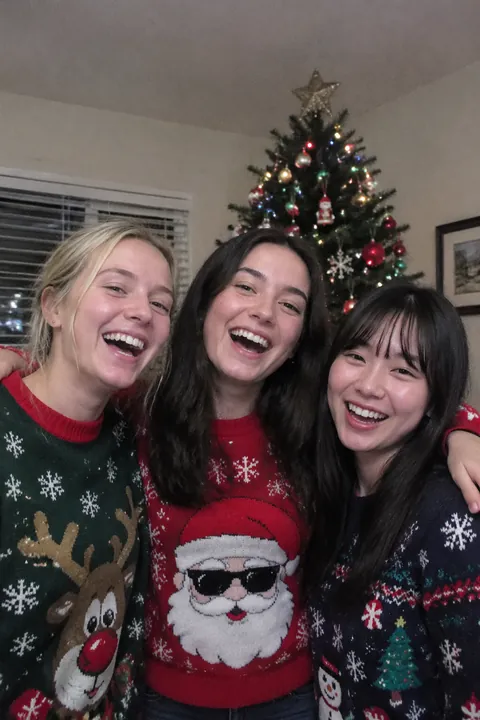
- Matching sweaters on the porch Everyone in the worst sweater they could find, lined up on the steps, arms around each other.
Make your Christmas photos move
In Add effects, the free Hats & headbands pack has a santa hat and a reindeer headband, and Neck things has a scarf. Pick a pack, the stickers land on the person in about a second, and tap Shuffle for a new set. With Tada Pro, Holidays adds a snow globe and Sweet & cozy adds a snowman and snowflakes. The stickers keep moving in the saved Live Photo; see how to add stickers to photos.
For the tree or the cocoa with no one in it, Natural in Make it Live moves what’s already there, like lights and steam. It uses AI on Tada’s servers with OpenAI and xAI, and Tada asks first (privacy). And My lines in Draw is free: draw snowflakes on the window with your finger and they wiggle like a hand-drawn cartoon.
iPhone tips for Christmas photos
- For tree lights, leave the flash off and rest the phone on a table or the back of a chair so the photo stays sharp in the dim room.
- Use Portrait mode with the tree a few steps behind the person; the lights turn into soft circles. Tap Depth to blur them more.
- Swipe the Shutter button left for a burst when the presents start opening.
- Leave Live Photo on for Christmas morning, then pick the best frame later with Make Key Photo.
Questions
How do you take good photos of Christmas lights on an iPhone?
Turn the flash off, brace the phone so it stays still, and shoot at dusk when there’s still a little light in the sky. Portrait mode turns lights behind a person into soft circles.
What are cute Christmas photo ideas for kids?
Kids waiting at the top of the stairs on Christmas morning, faces lit by the tree, decorating cookies, and meeting Santa shot from the side. Real moments beat posed ones.
Can I put a Santa hat on a photo?
Yes. In Tada, tap Add effects, pick a photo and choose the Hats & headbands pack, which includes a santa hat. Tap Shuffle for a new set, drag or pinch the hat to fit, and tap Save; it keeps moving in the Live Photo.
Sources: Apple Support: Take and edit Live Photos · Apple Support: Take Burst mode shots · Apple Support: Take portraits with your iPhone camera