Newborn photo ideas
At home, the safest newborn photos are also the sweetest: tiny details, a baby asleep on their back, and a baby in someone’s arms. Here are 16 simple ideas you can take with an iPhone by a window, with no props or poses that ask anything of the baby.
Safety first
- Never pose a baby in a way that needs support. The “froggy” pose (chin on hands) and babies in hanging slings or baskets are made by trained newborn photographers with a spotter and are often two photos combined. Follow a professional’s lead on those, or skip them.
- Keep the baby on a low, flat surface like the floor or the middle of a bed, with an adult within arm’s reach. Never leave them on a table, chair or sofa edge.
- Keep the room warm and the session short. Feed, burp and change first, and stop when the baby has had enough.
- Props are for the photo only. When you’re done, the baby goes back to sleep on their back in an empty crib or bassinet.
Details and quiet moments
- Tiny toes Shoot the bottoms of the feet from the end of the blanket, close enough to see the wrinkles.
- A hand around a finger Let the baby grip a parent’s finger and shoot just the two hands. Add a grandparent’s finger for a second version.
- The sleepy profile With the baby asleep on their back, shoot from the side, level with the face, light coming from the window behind you.
- Eyelashes, ears and hair swirls Close-ups of the small things you’ll forget: the curl of an ear, the lashes, the swirl at the crown.
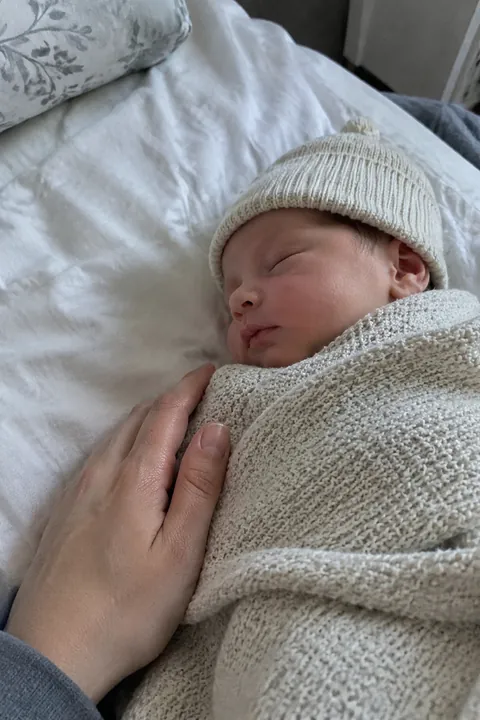
- Swaddled from above Baby on their back on a plain blanket in the middle of the bed. Stand beside the bed, not over the face, and shoot down.
- A knit wrap and hat Same shot in a soft wrap with a matching hat. One bright color against a plain blanket is enough.
- The hospital keepsakes The ID bracelet, the first hat and the going-home outfit laid on a blanket. No baby needed for this one.
- The same plush, every month Put one stuffed animal beside the baby on the play mat for a photo each month, then take it away. Side by side, the size change is the story, all the way to their first birthday.
With the people who love them
- Skin to skin A parent reclines with the baby on their bare chest, both hands on the baby. Shoot from beside them, at the parent’s eye level.
- Looking down at the baby Shoot over the parent’s shoulder as they hold the baby in their arms. The parent’s face can stay out; the baby is the light.
- The football hold A parent holds the baby along their forearm, hand under the chest and head supported. The size difference says it all.
- The big sibling Sit the older child on the couch, lay the baby in their lap, and keep a parent’s hand under the baby just out of frame. Shoot the sibling’s face.
- Grandparents meeting the baby Don’t pose it. Stand back and shoot the first look, in burst.
- Feeding time Breast or bottle, the quiet light of a night feed or a sunny morning. Shoot from the side, not from above.
- The first bath Shoot the parent’s hands holding the baby in the sink or baby tub, one hand always under the head and neck.
- Going home in the car seat The baby buckled in properly, straps snug, in the going-home outfit. A good photo and a good check.
Make your newborn photos move
Breathe in Make it Live is free and made on your phone in about a second: people breathe softly in a seamless loop, which suits a sleeping baby. Natural uses AI for small, candid motion, like a breath or a slight shift, with the camera kept still.
For a birth announcement, the Sun & Moon look in Add effects puts a smiling sun or a sleepy crescent moon on the baby’s head, with tiny planets and stars around, in brush-pen marker; the sun or moon blinks. Natural and Sun & Moon are AI tadas: the photo goes to Tada’s servers and to OpenAI and xAI, and Tada asks before the first one. If you’d rather not send your baby’s photo to AI partners, stick with Breathe, which is made on your phone. Details are on the privacy page.
iPhone tips for newborn photos
- Turn the flash off and shoot by a big window in the daytime. Soft side light is kinder to newborn skin than ceiling lights.
- Never hold the phone directly over the baby’s face. Shoot from the side, or use a phone strap.
- Leave Live Photo on. Newborn faces change every second, and you can pick a different key photo later in Photos.
- Use Portrait mode for the toes and hands. It keeps the detail sharp and softens the blanket behind.
- Want both parents in the shot? Lean the phone on a shelf, tap the Camera Controls button, then Timer and 10.
Questions
When should newborn photos be taken?
Many newborn photographers like the first two weeks, when babies sleep deeply and curl up. At home, any calm, well-fed moment works, and simple photos look lovely at any age.
Is the froggy pose safe to do at home?
No. Professionals make it with a spotter holding the baby and usually combine two photos. At home, keep the baby flat on their back on a low surface or in someone’s arms.
Can I take newborn photos myself with an iPhone?
Yes. Use window light with the flash off, keep the setup on the bed or floor, and focus on details and the baby in your arms. Portrait mode helps with close-ups.
Can I make a newborn photo move?
Yes. In Tada, tap Make it Live and pick the photo. Breathe is free and made on your phone; Natural uses AI. Tap Save to put it in Photos as a Live Photo.
Sources: Apple Support: Take and edit Live Photos · Apple Support: Use iPhone camera tools · Apple Support: Take portraits with your iPhone camera