Concert photo ideas
The concert photos you’ll keep aren’t only of the stage. Shoot the line outside, your friends singing, the lights over the crowd and the walk out. Here are ideas for before, during and after the show, and how to get them without blocking anyone’s view.
Before the show
- Ticket against the marquee Hold your ticket or wristband up in front of the venue sign. It’s the opener for your post.
- The line around the block The queue wrapping down the street, or your group in matching band shirts waiting at the door.
- Outfit check A full-length photo of your concert outfit against a plain wall near the venue, before the crowd and the heat.
- The empty stage The stage before the band comes on, crew moving gear, lights low. It holds the feeling of waiting.
- The merch table The wall of shirts lit up, or your new one held up by the shoulders. Shoot it before the line grows.
- Selfie with the stage behind Turn around for a quick selfie with the stage over your shoulder before the lights go down, then face front again.
During the show
Be a good neighbor: keep your phone at chest height, not above your head, and take a few photos per song instead of filming whole sets. Check the venue’s and the tour’s camera rules before you go; many venues ban cameras with detachable lenses, and some shows are phone-free, with phones locked in pouches. If it’s phone-free, enjoy the show.
- A sea of phone lights During a slow song the crowd lights up. Shoot wide from where you stand to catch hundreds of tiny lights.
- Silhouettes against the stage Hands in the air, black against bright stage light. Tap the stage to focus, then drag the exposure down so the crowd goes dark.
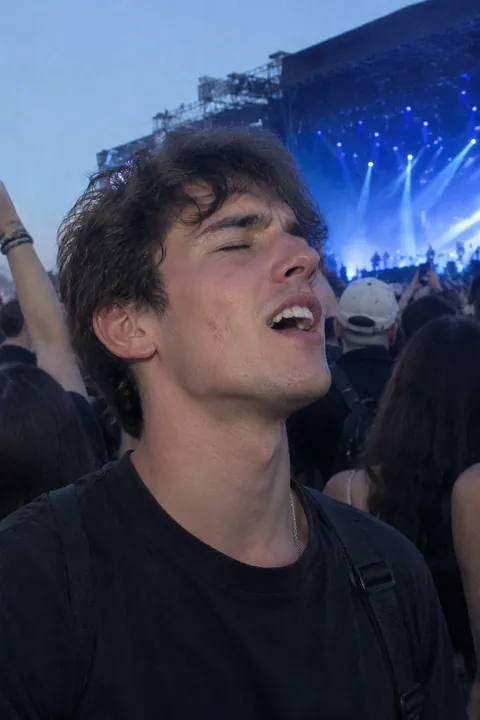
- Your friend mid-chorus Turn sideways and catch your friend singing with the stage glow behind them. These are the photos you’ll look at most.
- The confetti drop When the cannons go off, point up and shoot a burst; the pieces only hang in the air for a moment.
- The big screen If the stage is far, frame the video screen with a strip of heads below it. It reads better than a tiny zoomed-in stage.
- Light beams through haze Spotlights cutting through stage haze make beams. Shoot them from below with no people at all.
- Your hands on the barrier If you’re on the rail, shoot your hands on the barrier with the stage beyond. It shows exactly where you were.
After the show
- The crowd spilling out Everyone pouring into the street under the venue lights. Shoot from the steps for a little height.
- A setlist or pick in your palm If you caught one, shoot it in your hand under a streetlight.
- Late-night food, wristband on Pizza or fries after the show with the wristband still on your arm. The honest last slide.
- The festival campsite at sunrise At a festival, the tents, flags and the quiet morning after the noise.
Make it move
A still never quite holds the night. In Tada:
- Soundtrack fits a photo of your friend singing or your group outside: drawn music notes, a little vinyl record and sound-wave squiggles around the subject, and the notes bob to a beat. It’s a drawing; there’s no sound. Expect it to take about a minute.
- Natural for the light beams or the phone lights: with no people in the shot, what is already there moves, lights included. It takes 20–40 seconds.
- Stickers for the outfit photo. Vibes has fireworks, confetti and bokeh, and Things to hold has a mic. Pick a pack and a set lands on you in about a second; tap Shuffle for another. Free.
Soundtrack and Natural are AI tadas, made on Tada’s servers with OpenAI and xAI after you agree. Privacy.
iPhone tips for concert photos
- Leave Live Photo on. It records 1.5 seconds before and after you tap, so a still of the confetti drop keeps the moment around it. To replay it, see how to make a Live Photo loop.
- Stage lights fool the camera into blown-out faces. Tap the stage, then drag the exposure down a little.
- Leave the flash off. It can’t reach the stage and only lights up the heads in front of you.
- Swipe the Shutter button to the left for a burst during jumps and confetti.
Questions
Can I bring my phone to a concert?
Usually, but rules vary. Check the venue’s and the tour’s policy before you go; some shows lock phones in pouches, and many venues ban cameras with detachable lenses.
How do I take better concert photos with an iPhone?
Shoot wide rather than zooming, tap the stage and lower the exposure, turn off the flash and take a burst. Take a few, then put the phone away and watch.
Does the Soundtrack look add music?
No. Soundtrack draws music notes, a record and sound waves that bob to a beat, but there’s no sound. Tada doesn’t add music.
Sources: Apple Support: Take and edit Live Photos · iPhone User Guide: Use iPhone camera tools to set up your shot · iPhone User Guide: Capture action shots with Burst mode