Couple photo ideas you can shoot on an iPhone
Good couple photos come from doing something together, not from standing side by side and smiling. Here are 20 ideas: close poses that feel natural, everyday places that look good on a phone, and candid moments worth catching with Live Photo on. Then make your favorite one move with Tada.
Poses for two
- Forehead to forehead Stand close, touch foreheads and close your eyes. Shoot from the side at chest height so both profiles line up against a plain background.
- Chin on the shoulder One stands behind the other and rests a chin on their shoulder, both looking into the lens. It works at arm’s length with the front camera, so you don’t need anyone else.
- The walk-away Hold hands and walk slowly down a quiet path while one of you looks back. Ask a friend to shoot, or lean the phone on a wall with the 10-second timer.
- The piggyback Climb on and try to stay up. The wobble and the laugh that follows are the picture, so keep shooting the whole time.
- Whisper something silly One whispers something ridiculous into the other’s ear. Point the camera at the listener and catch the reaction a second later.
- The dip A dance-floor dip looks dramatic when you shoot from low down, close to the ground, with sky or string lights behind you.
- Hands only Fill the frame with your hands: fingers laced on a café table, matching rings, the same bracelet. A good shot for anyone who doesn’t like their face in photos.
- One jacket for two Squeeze into one oversized jacket, hoodie or blanket on a cold evening. Getting both heads out is half the fun.
Places and everyday moments
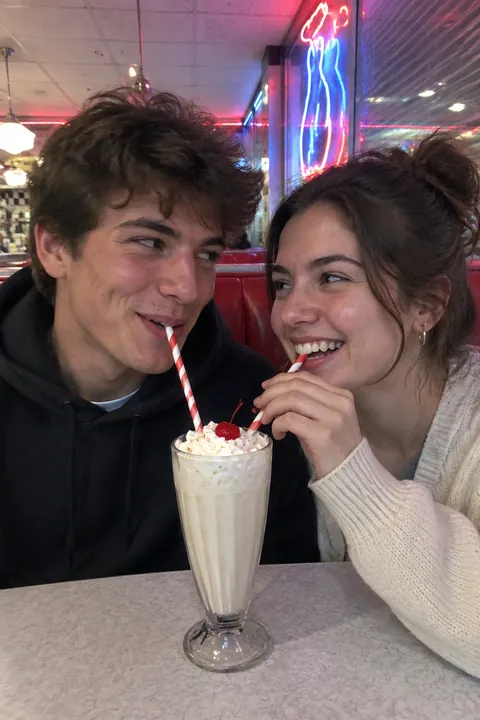
- Same side of a diner booth Slide in next to each other with one milkshake and two straws. Pick the booth by the window so the light falls on your faces from the side.
- Cooking together Flour on a nose, a taste off the spoon, one stirring while the other steals a bite. Kitchen window light is soft and even.
- Front seat at golden hour Park facing the sunset and shoot from the back seat over both shoulders, or prop the phone on the dashboard with the timer.
- Top level of a parking garage City lights behind you, open sky above. Stand against the sunset for a silhouette, or face it for warm light on your faces.
- A photo booth strip at home Sit against a plain wall and make four faces in a row: serious, kiss, laugh, surprised. Shoot in Burst mode, then keep the best four.
- One umbrella in the rain Share a clear umbrella under a streetlight. Wet pavement reflects the light, and you have a reason to stand close.
- Heads together on a blanket Lie head to head, faces up, and hold the phone straight above you at arm’s length. Scatter snacks, a book and a few flowers around you.
- Pick a book for each other In a bookstore aisle, each of you chooses a book for the other. Shoot over the shelf as you hand them over.
- Arcade glow Stand by a claw machine or a row of game screens; the colored light is flattering after dark. The moment you win, or lose by one point, is the shot.
- Movie night from behind Shoot from the back of the couch: two heads, one blanket, the screen glowing in front. Turn the room lights off so the screen does the lighting.
- Ferris wheel at dusk Sit across from each other in the cabin as the fairground lights come on below. Rest the lens against the window to cut reflections.
- Morning coffee on the steps Two mugs, bed hair, a porch or front stoop in early light. Shoot from the sidewalk so the doorway frames you both.
Make it move
A Live Photo only catches a moment either side of the shot, so the laugh you wanted is often just outside it. Tada starts from any still in your camera roll, even one from years ago, and saves a new Live Photo:
- Lively for the piggyback, the whisper and the diner booth: people laugh, turn their heads and gesture, and hair and clothes swing.
- Natural for the quiet shots, like forehead to forehead or heads on the blanket: you both blink, breathe and smile a little while the camera stays still.
- Draw for an inside joke: circle the two of you with a heart, or draw an arrow at whoever stole the fries, then pick My lines so your own lines wiggle like a cartoon. That one is free.
Natural and Lively are AI tadas and take 20–40 seconds; you get 3 free. Tada asks before the first one, because the photo goes to Tada’s servers, where OpenAI checks it and xAI makes the motion (privacy). More ways in how to animate a photo.
iPhone tips for couple photos
- Leave Live Photo on; it’s on by default in Photo mode and records 1.5 seconds before and after the shot. In Photos, tap Edit, then the Live Photo button, drag to the frame where you’re both mid-laugh and tap Make Key Photo.
- When it’s just you two, tap the Camera Controls button, tap Timer and choose 10. Lean the phone on a bag or a ledge at chest height.
- For piggybacks and dips, swipe the Shutter button to the left to shoot in Burst mode, then keep the frame where nobody blinked.
- Swipe to Portrait mode to blur a busy street behind you. Live Photos are taken in Photo mode, so shoot a few there too.
Questions
What are some cute couple photo ideas at home?
Cook together, make a four-frame photo booth strip against a plain wall, lie head to head on a blanket, or shoot movie night from behind the couch. Window light and the TV screen do most of the lighting.
How do you take couple photos by yourselves?
Lean the phone on something steady at chest height, set the 10-second timer and step into the frame. For close poses, the front camera at arm’s length is enough.
How do you pose for couple photos without looking awkward?
Give yourselves something to do: walk, whisper, cook, read to each other. A real reaction looks better than a held smile, and Burst mode makes sure you catch it.
What should couples wear for photos?
Coordinate instead of matching: pick two or three colors that go together and give each of you one texture, like denim and a knit. Skip big logos and tiny stripes.
Sources: Apple Support: Take and edit Live Photos · iPhone User Guide: Use iPhone camera tools to set up your shot · iPhone User Guide: Capture action shots with Burst mode · iPhone User Guide: Take portraits with your iPhone camera