Father’s Day photo ideas
Father’s Day photos land when they show what you actually do with him: the shoulder rides, the grill, the car, the bad jokes. Here are poses with kids, props and places from his everyday life, and card and gift shots you can take with an iPhone.
Poses with Dad
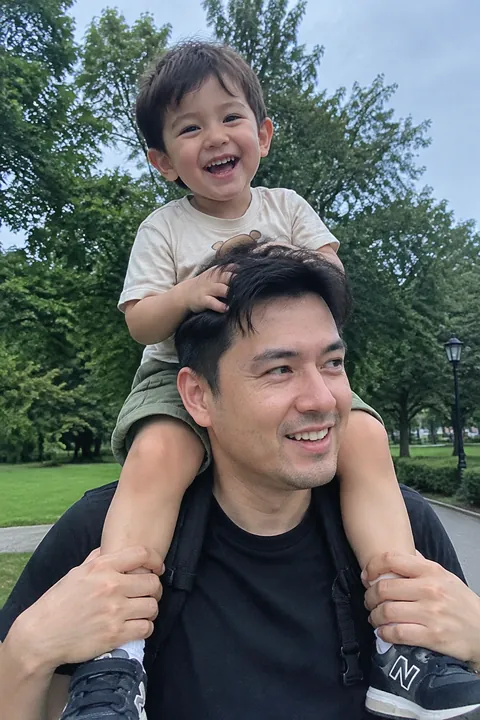
- Shoulder ride, from behind Shoot from behind and a little below as a kid rides on Dad’s shoulders, both looking at the same thing: a parade, a game, the ocean. Their backs tell the story.
- The copycat pose Dad and kid on the porch steps with the same crossed legs, the same elbow on the knee, the same serious face. Then ask them to break and laugh, and keep shooting.
- Tiny hand, big hand A baby’s hand wrapped around Dad’s finger, or a kid’s hand on top of his. Fill the frame with hands only.
- The lift Dad lifts a toddler overhead against open sky. Lie on the grass and shoot up so there’s nothing behind them but blue.
- Story time Dad reading a picture book on the couch with a kid tucked under each arm. Shoot from the doorway so it feels unposed.
- Three generations on one bench Grandpa, Dad and kid in a row, same pose, oldest to youngest. Sit them close so the frame stays tight.
- The recliner nap The classic Dad nap, remote still in hand. Shoot quietly, and ask before it goes in the family chat.
- The lesson Dad showing a kid how to tie a tie, cast a line or check tire pressure. Shoot over the kid’s shoulder so his hands and face are both in frame.
Props and places
- At the grill Dad in an apron, tongs raised, smoke drifting across the frame. Shoot from the side in late-afternoon light so the smoke shows up.
- His car or truck Dad leaning on the car he’s proud of, or the kids packed into the back seat. A low angle from the bumper makes it look as big as he thinks it is.
- Recreate an old photo Find a photo of Dad holding you as a baby and restage it: same spot, same pose. Post the two side by side.
- His workbench, from above His worn hammer, tape measure, fishing lures or golf tees laid out on the bench. The things he uses every day say a lot about him.
- His shoes next to theirs Dad’s work boots beside a toddler’s sneakers on the front step. Shoot from ground level.
- Catch in the yard A game of catch or a kid trying to block his shot. Pick the frame where the ball is in the air.
Card and gift shots
- The sign with his catchphrase Kids hold a hand-drawn sign with the thing he always says. Make the letters big and dark so they read on a phone.
- Opening the gift Shoot over Dad’s shoulder as he unwraps it, then turn to his face for the reaction.
- Same chair, every year The same photo in the same chair every Father’s Day: Dad, the kids, the year on a card. In ten years it’s the gift he’ll ask for.
Make it move
Send Dad a photo that moves on Sunday morning. Open Tada, pick the photo, and try one of these:
- Lively for the shoulder ride, the lift or the game of catch: people laugh, turn their head and wave, and hair and clothes swing. It takes 20–40 seconds.
- Stickers for the card photo. Hats & headbands has a chef hat and a cowboy hat, Neck things has a bow tie and a medal, and Nose & mouth has a moustache. Pick a pack and a set lands on Dad in about a second; tap Shuffle for another, and drag any sticker you don’t want to the bin. Free.
- Crayon Hearts for the recreated photo: puffy pastel-crayon hearts, two tiny love letters and heartbeat squiggles drawn around him. This AI look keeps the photo exactly as it is and takes about a minute.
Tap Save and it goes to Photos as a Live Photo, ready to send in Messages. To bring the old photo itself to life, see how to animate a photo.
Lively and Crayon Hearts are AI tadas. Tada asks before the first one, then the photo goes to Tada’s servers, where OpenAI and xAI make it; you get 3 free. Privacy.
iPhone tips for Father’s Day photos
- If you’re the dad, use the Timer: swipe up from the camera modes, tap Timer, choose 3, 5 or 10, then tap the Shutter button and get in the frame.
- For the lift and the game of catch, swipe the Shutter button to the left to take a burst, then tap the burst thumbnail and keep the frames you like.
- Use Portrait mode for the hands close-up and the recreation, so faces stay sharp and the yard blurs.
- Leave Live Photo on for the gift opening. It records 1.5 seconds before and after you tap, and Make Key Photo in Photos lets you pick the exact moment he smiled.
Questions
What can I do for a Father’s Day photo shoot at home?
Use what’s already there: the porch steps, his chair, the grill, the car. A shoulder ride, a recreated old photo and a sign with his favorite saying need nothing but an iPhone.
How do I recreate an old photo with my dad?
Find the original, go back to the same place if you can, and match the pose and the camera height. Hold the old print up next to the scene to check the angle before you shoot.
How do I put a hat or moustache on Dad in a photo?
In Tada, tap Add effects, pick the photo and choose a pack such as Hats & headbands or Nose & mouth. A set lands on him in about a second, keeps moving in the saved Live Photo, and it’s free.
Sources: Apple Support: Take and edit Live Photos · iPhone User Guide: Use iPhone camera tools to set up your shot · iPhone User Guide: Capture action shots with Burst mode · iPhone User Guide: Take portraits with your iPhone camera