Thanksgiving photo ideas
Thanksgiving photos come out well when you shoot the parts of the day people remember: the kitchen before dinner, the full table, the hands passing dishes, the walk after. Here are ideas for the food, the family and the quiet moments in between.
The kitchen and the food
- The turkey coming out Stand to the side of the oven, out of the cook’s way, so their face, the oven mitts and the steam are all in frame. Have the camera open before the door does.
- Hands at the cutting board Grandma’s hands crimping pie crust or chopping celery, shot close from above. Flour on the counter adds texture.
- Pies in a row Line the pies up and shoot from counter height with the kitchen soft behind them. Wait for someone to reach in for a sliver.
- The recipe card The handwritten card or the stained cookbook page next to the finished dish. It’s the photo the family will want in twenty years.
- The gravy pour Gravy streaming from the boat onto a mound of mashed potatoes. The good frame lasts a split second, so take a burst.
- The kids’ table Get down to kid height and shoot along the table: paper turkeys, crayons, cranberry sauce on someone’s chin.
- The midnight leftover sandwich Turkey, stuffing and cranberry between two slices of bread, on the counter under one lamp. The real last course.
The table and the family
- The full table from above Before anyone sits, stand on a sturdy chair at the end of the table and shoot down its length: every dish, every place card, nothing touched yet.
- Down the table, everyone seated From one end at eye level, with everyone turned toward you. Ask the far end to lean in so they aren’t tiny.
- The toast Glasses raised, one person mid-sentence. Shoot from across the table so the glasses catch the candlelight.
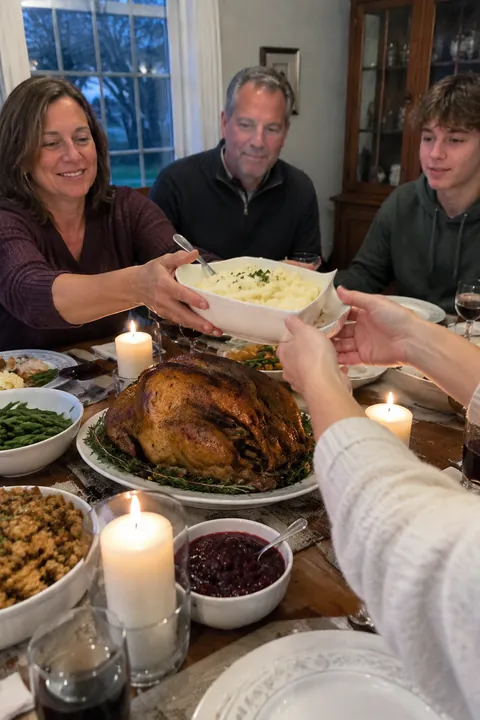
- Passing the dishes Hands and bowls crossing the frame. It’s the most Thanksgiving thing that happens at the table, and nobody has to pose.
- Thankful cards Everyone writes one thing they’re grateful for on a card at their seat. Shoot each card in its owner’s hands, or all of them laid out after dinner.
- Generations on the couch Grandparents, parents and kids squeezed onto one couch after dinner, the game on behind them. Use the timer so you’re in it too.
- The walk after dinner Fallen leaves, low sun, everyone in coats. Shoot from behind as the group heads down the sidewalk.
- The pet waiting for scraps The dog under the table or the cat on a chair staring at the turkey. Get low and focus on the eyes; more in cat photo ideas.
- Dishes done A sink full of roasting pans, two people drying, a towel over a shoulder. The end of the day deserves a frame.
Make it move
A table photo with a little motion feels like you’re back in the room. In Tada:
- Natural suits the table and the kitchen. In a shot of just the food, what is already there moves: steam off the gravy, candle flames, leaves outside the window. With people, they blink, breathe and smile a little. It takes 20–40 seconds.
- Breathe fits the generations-on-the-couch photo: everyone breathes softly in a seamless loop. It’s free and made on your phone in about a second.
- Pocket Pals for the pies or a place setting: three small cute creatures made from what’s in the photo, drawn flat and kawaii, that swing and peek. It’s an AI look and needs about a minute.
Tap Save and it lands in Photos as a Live Photo you can send to the relatives who couldn’t make it. For more posed group shots, see family photo ideas.
Natural and Pocket Pals are AI tadas, made on Tada’s servers with OpenAI and xAI after you agree; Breathe is made right on your iPhone. Privacy.
iPhone tips for Thanksgiving photos
- Shoot the food by a window, before the sun goes down, with the overhead light off. It keeps the colors true.
- For the family photo, prop the iPhone on a stack of books, swipe up from the camera modes, tap Timer and choose 10.
- When dinner runs late, Night mode turns on by itself in low light. Hold still until the capture finishes, or rest the iPhone on the table.
- For the gravy pour and the toast, swipe the Shutter button to the left to take a burst.
- Use Portrait mode for a single plate or slice of pie, so the background falls into a soft blur.
Questions
How do you take a good Thanksgiving table photo?
Shoot it before anyone sits, from above or from the end of the table at standing height, in window light. Clear phones, chargers and stray cups out of the frame first.
How do I get everyone in the Thanksgiving family photo?
Prop the iPhone on something steady, set the camera timer to 10 seconds and join the group. Take several, since someone always blinks.
Can I make a Thanksgiving photo move?
Yes. Tada makes photos from your camera roll move and saves them to Photos as Live Photos. Breathe is free; Natural uses AI to move steam, candles and people.
Sources: iPhone User Guide: Use iPhone camera tools to set up your shot · iPhone User Guide: Take Night mode photos · iPhone User Guide: Capture action shots with Burst mode · iPhone User Guide: Take portraits with your iPhone camera