Pregnancy announcement photo ideas
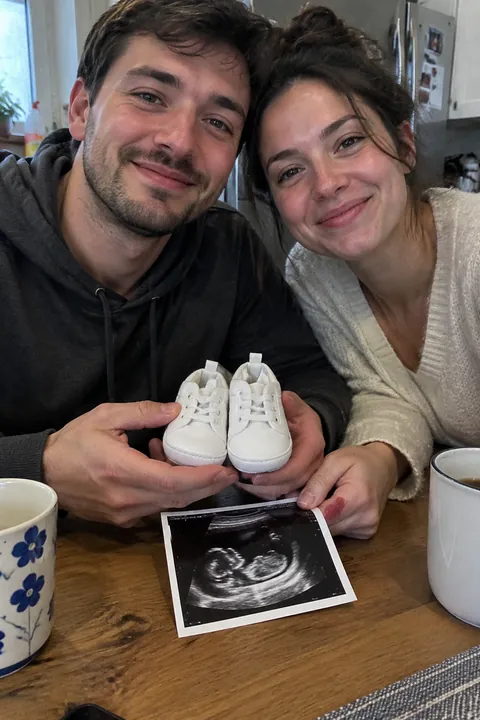
A pregnancy announcement photo needs to say “baby” at a glance, usually with one small prop: tiny shoes, the ultrasound, a bun in the oven. Here are 20 ideas, from simple props to small surprises and shots with siblings and pets, that you can take at home with an iPhone.
Props
- Tiny shoes in the line-up Line up everyone’s shoes by the front door and add one tiny pair at the end. Shoot from low, along the row.
- Ultrasound on the fridge Pin the scan under a magnet among the family photos and shoot the whole fridge door.
- Pea in a pod Hold an open pea pod over your palm with one pea for each of you, the smallest at the end.
- Bun in the oven Put one bread roll in the oven, switch on the oven light and shoot through the glass door.
- One more on the shelf In fall, line up a pumpkin for each family member plus one tiny gourd; in December, hang one extra small stocking.
- Clothesline by size Peg up shirts from the biggest to the smallest, ending with a tiny bodysuit.
- Matching jerseys Hang a parent’s team jersey beside a tiny one in the same colors.
Small surprises
- The box for your partner If your partner doesn’t know yet, put the test or the scan in a small gift box and shoot a burst of their face as they open it.
- Circled on the calendar Shoot a hand drawing a heart around the due date on the kitchen calendar.
- Three mugs Two coffee mugs and a tiny baby bottle lined up on the breakfast table, with morning light from the side.
- The empty frame Hang an empty frame among the family photos and shoot the whole wall.
- Where it started Hold the scan up at the place you met or got engaged, with the place clearly in the background.
- The crib box The flat-packed crib leaning in the hallway, and the family dog sniffing it.
- Footprints at the beach Two big sets of footprints in wet sand and a pair of tiny shoes at the end of them.
With family and pets
- Big sibling shirt Give the older child a “big brother” or “big sister” shirt and photograph them reading it, or holding it up.
- The dog knows The family dog wears a bandana with the news, or sits beside a tiny pair of shoes.
- Two car seats Shoot the back seat with the older child’s car seat and a new infant seat beside it.
- Telling the grandparents Hand them a framed scan and photograph their faces as they work out what it is.
- Siblings and the bump The older kids put their ears to the bump as if listening. Shoot at their eye level.
- A chair for each Line up chairs from biggest to smallest at the kitchen table, with a high chair at the end.
Make it move
Open the photo in Tada and add a little life:
- Natural in Make it Live keeps it gentle: people blink, breathe and smile a little, and hair and clothes move a little, so nothing pulls attention from the news.
- Bunny Buddy, an AI look, paints a big, soft, sleepy bunny peeking from behind the subject’s shoulder, with flowers, in a picture-book style that feels like a nursery.
- Draw: trace a heart around the circled date or a little star over the scan with your finger. My lines keeps your lines exactly as drawn and makes them wiggle (free); Make it cute turns them into a cute doodle that moves. See how to draw on photos.
Natural, Bunny Buddy and Make it cute each use 1 AI tada, and you get 3 free. Tada asks before the first one. For Make it cute, only your lines are redrawn, never the photo (privacy).
iPhone tips for announcement photos
- Shoot props by a window with the overhead lights off, from a chair if you need to get straight above them.
- Use Portrait mode to keep the tiny shoes sharp and the family behind them soft.
- To be in the photo together, swipe up from the camera modes, tap Timer and choose 10.
- For siblings and grandparents, shoot a burst: swipe the Shutter button to the left as they work it out.
Questions
When do people usually announce a pregnancy?
Many couples wait until the end of the first trimester, around 12 weeks, but there is no rule. Some tell close family first and post later.
What do you write with a pregnancy announcement photo?
Keep it short: the due month and the names, or a line from the older sibling. The photo does most of the work.
How can I make my announcement photo move?
In Tada, pick the photo and tap Make it Live, or draw a heart on it with Draw. Tap Save and it goes to Photos as a Live Photo you can send in Messages.
Sources: Apple Support: Take portraits with your iPhone camera · Apple Support: Use iPhone camera tools to set up your shot · Apple Support: Capture action shots with Burst mode on your iPhone camera