Sister photo ideas
Sister photos are best when they show your history: who braided whose hair, which clothes got handed down, the pose you’ve held since you were five. Here are 18 ideas for sisters of any age, from little kids to grown-ups, to shoot with an iPhone.
Poses
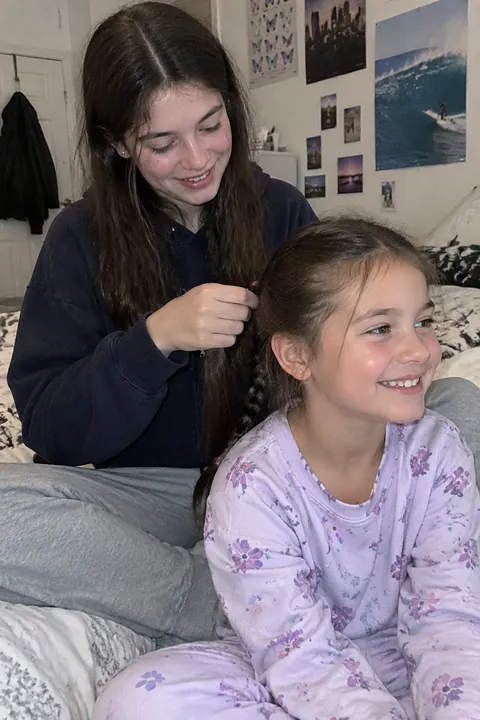
- Braiding each other’s hair One sister sits on the floor, the other on the bed behind her. Shoot from the side so you see hands and faces.
- Stacked faces Lie on the floor with your faces stacked one above the other, and shoot straight down from above.
- Big sister holds the baby Sit her on the couch with a pillow under her arm and shoot from slightly above.
- Cheek squish Squeeze cheek to cheek and shoot with the front camera held at arm’s length, just above eye level.
- The bed you shared Lie side by side with your heads on the pillows, like when you shared a room.
- Back to the door frame Stand back to back against the door frame where your heights were penciled in years ago.
Throwbacks
- Recreate a childhood photo Same spot, same pose, same squint. Hold the old print in the corner of the frame or post them side by side.
- The hand-me-down The younger sister wears the jacket or dress the older one wore in an old photo, holding that photo.
- Mom’s closet Both of you try on your mom’s old clothes and pose like her in her pictures.
- Grandma’s recipe Make the family recipe together: flour on hands, the handwritten card propped on the counter.
- Who’s who Each of you holds up a baby photo of yourself under your chin, so people can guess who grew into whom.
Days out
- Sister café date Two drinks, one small table, shot across the table as you lean in to share a pastry.
- Old playground swings Side-by-side swings at the playground you grew up near. Shoot as you pass the middle.
- Getting ready Zipping up a dress or doing each other’s makeup before a wedding, prom or night out.
- Same hairstyle Give each other the same braid or bun, then shoot the backs of your heads side by side.
- Twirl in matching dresses For little sisters: spin at the same time and shoot a burst for the moment the skirts flare.
- Tickle attack The older sister tickles the younger one. Burst gets the giggle.
- Teaching the little one Big sister runs alongside the bike, hand on the seat, as the younger one pedals. Shoot a burst from the front.
Make it move
Open a sister photo in Tada and try:
- Natural in Make it Live for the braiding photo: people blink, breathe and shift slightly, and hair moves a little.
- Pocket Pals, an AI look, for the café date: it adds a family of three small, cute creatures made from what’s in the photo, like coffee-bean critters by a drink, and they swing, wiggle and peek.
- Stickers: the Face stickers pack has freckles, glitter and star tears, and Earrings & ear things dresses up the ears. Tap Shuffle for a different set, and drag any sticker to the bin to remove it.
Natural and Pocket Pals use 1 AI tada each; you start with 3 free. Tada asks before it sends a photo to OpenAI and xAI (privacy). More throwback ideas: family photo ideas.
iPhone tips for sister photos
- Use Portrait mode for the braiding shot: hands and hair stay sharp, the room goes soft.
- For twirls and tickles, swipe the Shutter button to the left to shoot a burst.
- When recreating an old photo, match the camera height first. Most childhood photos were taken from an adult’s eye level.
- Keep Live Photo on and, in Photos, use Make Key Photo to pick the frame where you’re both laughing.
Questions
How do you pose two sisters for a photo?
Give them something to do together, like braiding hair or sharing a drink, rather than standing side by side. Get close: heads touching or cheek to cheek reads as sisters.
How do I recreate a childhood photo with my sister?
Bring the old photo along and match the place, the pose and the camera height. Similar clothes help, but the pose matters most.
What should sisters wear for photos?
Coordinate colors rather than matching exactly: two shades of the same color, or one pattern and one plain. Save identical outfits for recreating a childhood photo.
Sources: Apple Support: Take portraits with your iPhone camera · Apple Support: Capture action shots with Burst mode on your iPhone camera · Apple Support: Edit Live Photos on iPhone