Cat photo ideas
Good cat photos work with what your cat already does: sitting in boxes, watching birds, sleeping in patches of sun. Here are places, moments and props to try at home with an iPhone, plus how to get your cat to look at the camera.
Places and moments
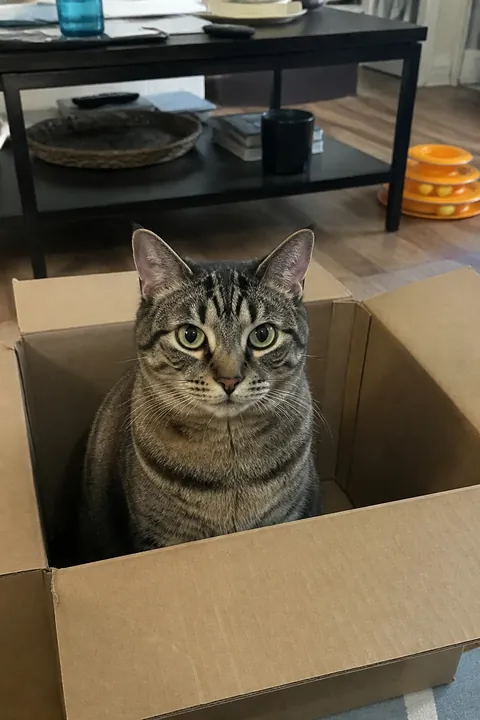
- The box Put an open cardboard box on the floor and wait. Shoot from box height as the head pops up over the edge.
- Window watch Your cat on the sill watching birds. Shoot from inside, behind and a little to one side, so the light outlines the whiskers.
- The sun-patch sprawl Late-morning sun on the floor or bed. Wait for the full stretch, belly up, and shoot straight down.
- Loaf mode Paws tucked, eyes half shut, on a folded blanket. Get level with the face and fill the frame.
- Peeking from under the covers Lift the edge of a duvet and catch the eyes in the dark gap. Night mode helps if the room is dim.
- On your keyboard The cat sprawled across the laptop while you’re trying to work. Shoot from your chair so the screen and paws are both in frame.
- The yawn Cats yawn right after waking. Have the camera ready and shoot a burst; the full-fang yawn lasts a split second.
- Top of the bookshelf Shoot up from the floor as your cat looks down from the highest spot in the room.
- Toe beans A close-up of paws tucked under or pads on display. Portrait mode keeps the fur sharp and the room soft.
- Mid-pounce Drag a wand toy across the floor and shoot low as the cat launches.
Props
- A paper bag Cut the handles off a paper bag and set it on its side. Shoot the moment only the tail is showing.
- A bandana for a few seconds Only if your cat tolerates it. A soft bandana is easier than a hat; take it off as soon as you have the shot.
- Cat-safe flowers A cat sniffing a bouquet makes a soft, pretty frame. Lilies and many other common flowers are toxic to cats, so use cat-safe or fake ones.
- Your hand, mid-scratch The slow blink while you scratch under the chin, with your hand in the frame.
- Mug, book and cat Your cat curled beside a mug and an open book on a Sunday morning. A cozy still life with one living part.
- A feather toy above the lens Hold a feather toy or a treat right above the iPhone so the cat looks straight into the camera.
- The cat-and-you selfie Hold your cat against your chest and take a selfie with the front camera. Shoot several; one of you will be looking.
Make it move
Cats are hard to film on cue, so start from a photo you already love. In Tada:
- Sun & Moon suits the nap and the loaf: a sleepy crescent moon or a smiling sun on your cat’s head, with tiny planets, orbit rings and stars around, drawn in brush-pen marker. This AI look keeps the photo as it is and takes about a minute.
- Natural fits the window watch or the box: pets blink, sniff and twitch their ears, and the camera stays still. It takes 20–40 seconds.
- Puff for the loaf or the toe beans: tap the spot you want and Tada puffs it up, then it bounces back, in a loop. It only enlarges the photo’s own pixels, it’s free, and it’s made on your phone in about a second.
Sticker packs are placed on people, so save them for the cat-and-you selfie. Tap Save and your tada goes to Photos as a Live Photo. Have a dog too? See dog photo ideas.
Sun & Moon and Natural are AI tadas: Tada asks first, then sends the photo to its servers, where OpenAI and xAI make it. Privacy.
iPhone tips for cat photos
- Use Portrait mode. Apple’s depth effect works on pets, keeping your cat sharp against a blurred background.
- Get down to your cat’s eye level, even if that means lying on the floor.
- During play, swipe the Shutter button to the left for a burst and keep only the sharp frames.
- In a dim room, Night mode turns on by itself; hold the iPhone still until it finishes. A sleeping cat is the easiest subject for it.
- Leave the flash off. It can startle a cat and makes the eyes glow.
Questions
How do I get my cat to look at the camera?
Hold a treat, a feather toy or something that crinkles right above the lens, or make one soft noise. Shoot the instant the head turns; it won’t last.
When is a good time to photograph a cat?
When it’s calm and the light is soft: mid-morning in a sunny window, or after a meal when it settles down to groom and nap.
Can I make my cat photo move?
Yes. In Tada, Natural uses AI to make pets blink, sniff and twitch their ears, and Puff is free and puffs up any spot you tap. Both save to Photos as Live Photos.
Sources: iPhone User Guide: Take portraits with your iPhone camera · iPhone User Guide: Take Night mode photos · iPhone User Guide: Capture action shots with Burst mode