21st birthday photo ideas
A 21st birthday deserves photos that look like a milestone: big balloon numbers, a cake you’ll remember and the people who showed up. Here are 18 ideas for props, group shots and solo photos, plus how to make your favorite one move.
Props and setup
- Between the 2 and the 1 Stand between giant foil number balloons and lean on one. Shoot from slightly below so the numbers tower.
- Sash and tiara Shoot the moment a friend puts the sash over your head, not after it’s on.
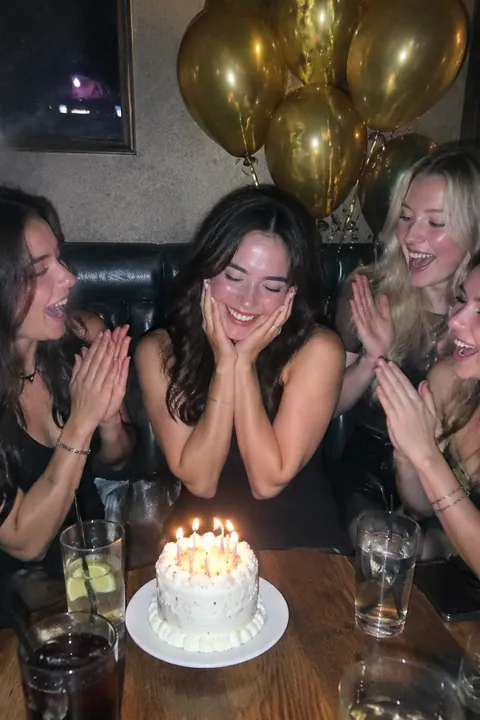
- All 21 candles Squeeze all 21 candles onto the cake and shoot the moment they’re lit, just before the song starts.
- The key In some families a big decorative key marks the 21st. Hold it up like a trophy, or have a parent hand it over.
- A letter from your parents Ask your parents to write you a letter for your 21st and shoot your face as you read it.
- Baby-photo cake Order a cake with your baby photo printed on top and hold it up next to your grown-up face.
With your people
- Everyone points The whole group points at the birthday person, who acts surprised. Shoot from a chair to fit everyone.
- Sparklers outside Light sparklers outdoors, away from hair and dresses, and shoot right after sunset.
- The dinner table Dressed up at a long restaurant table. Stand at the end and shoot down the row as everyone leans in.
- Instant-photo guestbook Each guest takes an instant photo, signs it and pins it to a board. Photograph the full board at the end of the night.
- Dance floor Shoot from the edge, low, with the party lights behind the dancers.
- Late-night snack run The whole crew around a tray of fries or a pizza box at midnight, shot from above.
- Bowling or roller rink Book a lane or a rink session and shoot a burst of the strike celebration or the first wobbly lap.
Solo shots
- First birthday, 21st birthday Hold your first-birthday photo next to your face and copy your baby expression.
- Outfit mirror selfie A full-length mirror before you leave, phone at chest height, the whole outfit in frame.
- 21 photos, 21 years Lay out one printed photo from each year of your life in rows on the floor and stand at the end of them.
- Birthday flat lay Your shoes, the gift, a 21 cake topper and your sunglasses on the bed, shot from above.
- Birthday brunch the next day Sunglasses on, pancakes with a single candle stuck in the stack.
Make it move
Open a birthday photo in Tada and pick:
- Lively in Make it Live: people laugh, turn their head, wave or gesture, and hair and clothes swing. Good for the group shots and the candle moment.
- 0.5 Pic, an AI look, re-shoots your photo as a “0.5 pic”, ultra-wide from close up and above, so whatever you hold (the cake, the balloon) looms huge. Then you move. It works best with one person in the photo.
- Stickers: Classic has a party hat and a balloon, Things to hold has a cake, a gift and a sparkler, and Vibes has confetti and fireworks. The Holidays pack (Pro) adds balloons and a party horn.
Lively and 0.5 Pic each use 1 AI tada, and the first 3 are free. Before the first one, Tada asks for your OK; it works with OpenAI and xAI (privacy). For any other year, see birthday photo ideas.
iPhone tips for party photos
- Under party lights, touch and hold the birthday person’s face on screen until AE/AF Lock appears, so the exposure doesn’t jump around.
- For candles, bowling strikes and group cheers, swipe the Shutter button to the left to shoot a burst.
- In a dim room, let the candles or string lights do the work. On iPhones with Night mode, it turns on by itself; hold still for a moment.
- Leave Live Photo on. If the best laugh came a beat late, open it in Photos and use Make Key Photo.
Questions
What should I do for my 21st birthday photos?
Pick one big prop, like giant 2 and 1 balloons or a key, and get a solo shot, a group shot and the candles. A throwback next to your first-birthday photo is an easy favorite.
How do I take good party photos on an iPhone?
Use the light in the room, like candles or string lights, instead of the flash, and lock exposure on faces. Shoot bursts for anything that moves.
Can I turn my birthday photo into a Live Photo?
Yes. Open Tada, tap Make it Live, pick the photo and choose how it moves. Tap Save and it goes to Photos as a Live Photo.
Sources: Apple Support: Use iPhone camera tools to set up your shot · Apple Support: Capture action shots with Burst mode on your iPhone camera · Apple Support: Take Night mode photos with your iPhone camera · Apple Support: Edit Live Photos on iPhone