Dog, puppy and dog birthday photo ideas
Great dog photos come from getting down to the dog’s eye level, a treat just above the lens and a lot of patience. Here are 21 ideas: everyday dog photos, puppy firsts and a dog birthday with a pupcake, then how to make your favorite one move.
Everyday dog photos
- The head tilt Hold the phone at your dog’s eye level and make one squeaky noise. Shoot a burst as the head tilts.
- Treat on the nose For dogs who know “wait”: balance a treat on the nose and burst as they flip it.
- Ears in the wind With someone else driving, shoot from the passenger seat as your dog looks out the window.
- Muddy paws Close-up of muddy paws on the doormat after a walk, with the guilty face out of focus behind.
- Strange sleeping spots Shoot from above, quietly, when your dog sleeps upside down or squeezed into a too-small bed.
- Trail view Leash in your hand at the bottom of the frame, dog ahead on the trail, shot from your own eye level.
- Fetch in mid-air Throw across in front of you, not toward yourself, and shoot a burst as the dog leaps.
- The shake-off After a swim or bath, stand to the side and burst as the water flies.
Puppy photo ideas
- Same toy, every month Photograph your puppy beside the same shoe or stuffed toy each month to show how fast they grow.
- First night home Puppy curled in a new bed with a blanket, shot by lamplight without the flash.
- Puppy in cupped hands If your puppy is small enough, hold them in both hands against your sweater and shoot close.
- Meeting the kids Kids lie on the floor and let the puppy come to them. Get down on the floor too.
- First bath Wrapped in a towel with just the face out.
- Caught with the evidence The chewed slipper on the floor and the puppy sitting next to it.
Dog birthday photo ideas
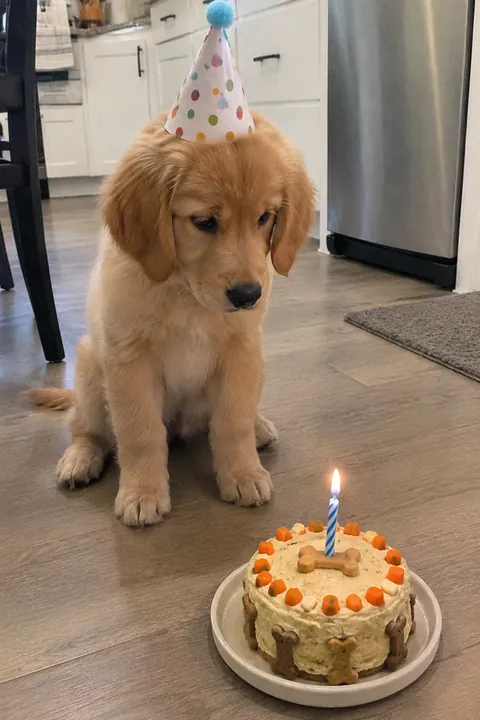
- The pupcake A small dog-safe cake or cupcake on the floor. Shoot as your dog stares at it, before the first bite.
- Birthday bandana A soft bandana or party collar is easier than a hat for most dogs; a few seconds of wearing it is enough.
- Number balloon Tie a number balloon to a chair behind your dog, and put it away after the photo so it doesn’t get chewed.
- Unwrapping a toy Wrap a new toy loosely in paper and burst as your dog rips it open.
- Party guests Your dog’s friends sitting around a treat on a mat, with someone holding treats above your phone.
- Puppy photo, grown dog Hold up a printed puppy photo next to your grown dog’s face.
- Birthday walk Your dog leading the way to their favorite park, shot from behind at their height.
Make it move
Open a dog photo in Tada and try these:
- Natural in Make it Live: pets blink, sniff and twitch their ears, and the camera stays still. For more energy, Lively makes pets look around, wag and pant.
- Puff is free and made on your phone in about a second. Tap your dog’s head, a paw or the pupcake to puff that spot up; it bounces back and shrinks again, in a loop.
- Draw a party hat over your dog’s head with your finger and choose My lines: it stays exactly as you drew it and wiggles like a cartoon (free). Sticker packs are placed on people, so for a dog on its own, drawing the hat is the way to go.
Natural and Lively use 1 AI tada each (3 are free); Tada asks before your first one and makes it with OpenAI and xAI (privacy). Cat at home too? See cat photo ideas.
iPhone tips for dog photos
- Get low. Shoot at your dog’s eye level, not down from standing height.
- Portrait mode works on pets as well as people: the dog stays sharp and the background blurs.
- Dogs rarely hold still, so shoot a burst: swipe the Shutter button to the left and lift your finger to stop.
- Hold a treat or a squeaky toy right above the lens to get eye contact, and give the treat after the shot.
Questions
How do I get my dog to look at the camera?
Hold a treat or a toy just above the lens and make one short sound. Shoot right away, and reward them after, so they learn the phone means good things.
What can I use for a dog birthday cake?
Use a recipe made for dogs and keep it simple. Leave out chocolate, grapes, raisins and anything with xylitol, and ask your vet if you’re unsure.
Can I make a photo of my dog move?
Yes. In Tada, tap Make it Live, pick the photo and choose Natural, Lively or Puff. Tap Save and it goes to Photos as a Live Photo.
Sources: Apple Support: Take portraits with your iPhone camera · Apple Support: Capture action shots with Burst mode on your iPhone camera