Birthday photo ideas
Most birthday photos happen in the ten seconds around the cake, so plan for those, then add a few shots from the rest of the day. Here are 20 birthday photo ideas for any age: the cake moment first, then the party, the outing and a solo shoot at home.
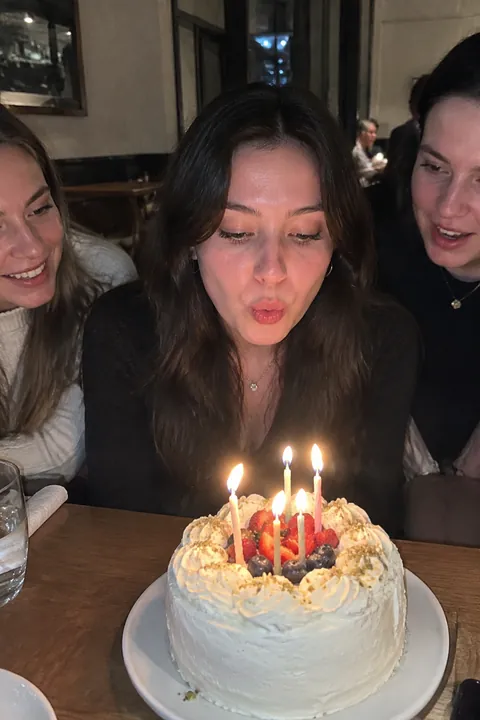
The cake moment
- The wish Eyes closed, hands together, candles lit, the second before blowing. Ask everyone to go quiet so it feels like one.
- Blowing out the candles Shoot from the side at table height, room lights off, so the candles light the face. Hold the phone steady with your elbows on the table.
- The singing crowd Stand behind the birthday person and shoot the faces singing to them, all lit by the candles.
- Number candles from above Before the cake comes out, shoot it straight down with the candles lit.
- The first bite A big forkful, frosting on the lip. Someone will push their face toward the cake; be ready.
- A sparkler candle at dinner At a restaurant, ask for a sparkler candle on the dessert and shoot the face behind the sparks.
The party and the rest of the day
- Breakfast in bed with a candle Morning of: a stack of pancakes with one candle, a paper crown, sleepy smile, window light.
- Under the balloon strings Fill the ceiling with helium balloons, let the strings hang, and lie on the floor or stand among them looking up.
- Giant number balloons Sit on the floor between two foil numbers, or hold them up over your head.
- The confetti toss Outside, throw a handful of confetti straight up and look up into it. Burst catches the frame where it’s still falling.
- Crooked party hats Everyone in a party hat, squeezed into one front-camera selfie, hats knocking together.
- Opening the present Shoot the face, not the gift, the second the paper comes off.
- The piñata swing For a kids’ party, stand well to the side and shoot a burst as the stick connects.
- The group jump Everyone at the party jumps on three. Shoot from low so they look higher.
- The birthday outing Bowling, skating, the arcade, the beach. One action shot of the birthday person doing the thing they chose.
- The toast Glasses clinking in the middle of the table, shot close, faces blurred behind.
- A streamer backdrop Tape crepe paper streamers in a doorway for an instant photo booth. Everyone takes a turn.
- The same spot every year Same chair, same pose, every birthday. Start this year.
- A solo shoot at home Balloons, a crown, your favorite outfit, the phone on a shelf and the timer on. A birthday self-portrait doesn’t need a party.
- The end of the night The wrecked cake, the deflating balloons, the birthday person asleep on the couch. The quiet after is part of the story.
Make your birthday photos move
For the candle shot, Natural in Make it Live adds small, candid motion: people blink and smile a little; in a photo with no people, what’s already there moves, lights included. It’s an AI tada made on Tada’s servers with OpenAI and xAI, and Tada asks before your first one (privacy).
Free in Add effects: the Classic pack has a party hat, a crown and a balloon, Things to hold has a cake, a gift and a sparkler, and Vibes has confetti and fireworks. With Tada Pro, Holidays adds balloons and a party horn. And Puff, free and made on your phone, puffs up the birthday person’s head and bounces it back. Planning a big one? See our 21st birthday photo ideas or first birthday photo ideas.
iPhone tips for birthday photos
- Turn the flash off for the candles. It washes out the glow that makes the shot.
- Leave Live Photo on. Candles go out in a second; later you can pick the exact frame with Make Key Photo.
- Swipe the Shutter button left for a burst during the confetti, the piñata and the jump.
- For the solo shoot or a group with you in it, tap the Camera Controls button, tap Timer, choose 10 and prop the phone up.
Questions
How do you take a good photo of someone blowing out candles?
Turn off the room lights and the flash, shoot from the side at table height, and keep Live Photo on so you can choose the exact frame afterwards.
How can I do a birthday photoshoot at home?
Pick a spot by a window, add balloons or a streamer backdrop, prop your phone on a shelf and use the 10-second timer. A crown or party hat is all the costume you need.
Can I add a party hat to a birthday photo?
Yes. In Tada, tap Add effects, pick the photo and choose the Classic pack, which includes a party hat. Tap Shuffle for a new set and drag the hat to fit.
Sources: Apple Support: Take and edit Live Photos · Apple Support: Take Burst mode shots · Apple Support: Use iPhone camera tools