Engagement photo ideas
Engagement photos look best when you move and talk instead of holding still: twirl, whisper, walk, go back to where it happened. Here are 18 ideas, poses first and then places, with the ring close-ups you’ll want for the announcement.
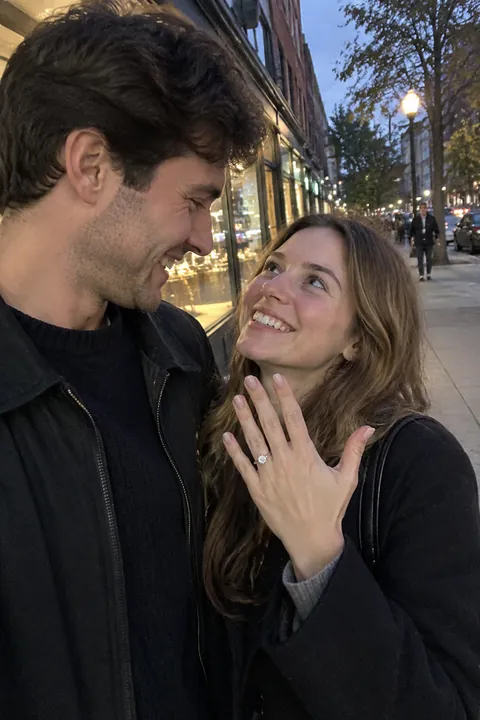
Poses for the newly engaged
- The ring hand on the chest Rest the hand with the ring flat on your partner’s chest, fingers relaxed. Shoot close and tap the ring on screen to focus on it.
- Hands laced together Fingers intertwined, ring on top, against a plain sweater or the sky. A small photo that announces it without a word.
- The almost-kiss Noses touching, eyes closed, a breath before the kiss. It usually looks better than the kiss itself.
- Forehead to forehead Stand close, hands on each other’s waist or face, foreheads together. Ask one of you to say something only the other can hear.
- The twirl One spins the other under an arm, on a sidewalk or a dock. Shoot in burst and keep the frame with the skirt or coat flying.
- The dip A slow, low dip, both laughing. Practice it twice before the camera comes out.
- Walking, one looking at the other Walk toward the camera holding hands. One looks ahead, the other looks at them. Then swap.
- Head in the lap One sits on a blanket, the other lies back with their head in their lap. Shoot from above or from the side, low.
- The piggyback One jumps on the other’s back and you both run at the camera. Nobody looks stiff mid-laugh.
Places and props that are yours
- The proposal spot Go back to exactly where it happened and restage the moment, kneel and all. Now someone can photograph it properly.
- Your first-date place The diner booth, the bookshop aisle, the bench outside the theater. Order what you had that night.
- Cooking dinner together Your own kitchen, one stirring, one sneaking a taste. Candid and very you.
- The ring on a coffee cup A morning shot of the ring hand around a mug on the table. Window light, no flash.
- A clear umbrella in the rain Rainy day? Huddle under a clear umbrella on a city street. The drops on the umbrella catch the light.
- The crosswalk at blue hour Just after sunset, cross a quiet street holding hands with the city lights coming on. Only when it’s safe and empty.
- Under string lights A patio or backyard with string lights, shot from a little farther away in Portrait mode so the lights blur into dots.
- The circled date Circle the wedding date on a paper calendar and photograph your hands holding it. Leave empty space for save-the-date text.
- With your dog Your dog sits between you, looking up. It’s the dog’s family photo too.
Make your engagement photos move
For the ring close-up and the quiet poses, Natural in Make it Live keeps the motion candid: a blink, a breath, a small smile, hair moving a little, with the camera still. It’s a nice way to send the news in Messages as a Live Photo.
For something sweeter, the Crayon Hearts look in Add effects draws puffy pastel-crayon hearts, two tiny love letters and heartbeat squiggles around you, and the hearts pulse. Or keep it free: the Vibes sticker pack has strings of hearts and petals, and Things to hold has a rose and a bouquet. Natural and Crayon Hearts use AI on Tada’s servers with OpenAI and xAI, and Tada asks before the first one (privacy). More couple shots in our couple photo ideas.
iPhone tips for engagement photos
- Tap the ring on the screen before you shoot so it’s the sharpest thing in the photo.
- Use Portrait mode for the two of you and tap Depth to soften a busy street behind you.
- Shooting without a friend? Tap the Camera Controls button, tap Timer, choose 10, and lean the phone on a wall or a bag.
- Keep Live Photo on for the twirl and the dip; later you can drag to the best frame and tap Make Key Photo.
Questions
When should you take engagement photos?
Many couples take them a few months after the proposal, early enough to use them on save-the-dates. Pick a season and a place you like, not just the first free weekend.
What should we wear for engagement photos?
Clothes you’d wear on a good date, in colors that go together without matching. Avoid tiny patterns and big logos, and bring a second outfit if you’re changing places.
How do we pose if we feel awkward on camera?
Don’t pose, move. Walk, twirl, whisper, cook together. Movement and a real conversation give more natural photos than standing still.
Can I take engagement photos with my iPhone?
Yes. Use Portrait mode for the two of you, tap to focus on the ring for close-ups, and use the 10-second timer when there’s no one to hold the phone.
Sources: Apple Support: Take and edit Live Photos · Apple Support: Use iPhone camera tools · Apple Support: Take portraits with your iPhone camera