Halloween photo ideas
The best Halloween photos show costumes in action, pumpkins glowing after dark and the small moments of trick-or-treating. Here are 20 ideas you can shoot on an iPhone: costume poses, pumpkin and prop shots, and night photos, then how to make your favorite one move.
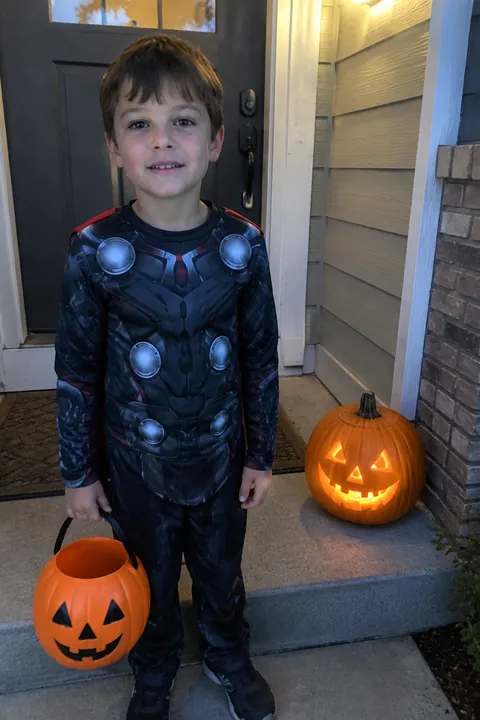
Costume poses
- Stay in character Ask for the costume’s signature move instead of a smile: the witch mid-spell, the superhero landing, the vampire behind a raised cape. A pose reads better than a grin under face paint.
- The unmasking Shoot the second a mask comes off or a hood drops back. Burst catches the frame where the face is half covered.
- Group costume line-up Line up a themed group, like a whole cartoon cast or a deck of cards, and shoot from a step above so every costume shows head to toe.
- Pet as the sidekick Dress the dog as the sidekick to your costume, crouch to its eye level and have someone hold a treat just above your phone.
- Costume detail close-up Fill the frame with fake blood drips, glitter around an eye or stitched seams. Portrait mode keeps the detail sharp and blurs the party behind.
- Halfway through the face paint Photograph the makeup half done, brush still in hand, with the mirror in the frame. It shows the work that went into the look.
Pumpkins and props
- Skeleton at breakfast Sit a plastic skeleton at the kitchen table with a coffee mug and the newspaper, and shoot it like an ordinary morning.
- Copy the jack-o’-lantern Hold the finished pumpkin beside your face and copy its carved expression, whether it’s a toothy grin or a shocked O.
- The candy haul Dump the bag on the floor, sort it by kind and shoot from overhead before the trading starts.
- Bedsheet ghost somewhere ordinary Put a friend under a white sheet with cut-out eyes and pose them on a park bench, at the laundromat or reading on the couch. The everyday backdrop is the joke.
- Giant spider Set a plastic spider right in front of the lens with your subject a few steps back looking scared, so the spider looks huge.
- Flashlight under the chin Turn off the room lights and light a face from below with a flashlight. One light is enough for a proper horror-movie look.
Trick-or-treat and night shots
- Heading to the next porch Shoot kids from behind as they walk to the next house, buckets swinging, porch lights ahead of them.
- At the door Stand back on the sidewalk and frame the whole doorway as the door opens and the candy bowl comes out.
- Glow-stick portrait Let glow sticks or a paper lantern light the face, keep everyone still for a second and let Night mode do the rest.
- A porch full of jack-o’-lanterns Shoot about 15 minutes after sunset, while the sky is still deep blue, so you get both the glow and the shape of the house.
- Hat-shaped silhouette Put a light behind your subject in a doorway and expose for the light. A witch hat or cat ears read instantly as a shadow.
- The jump scare Have someone jump out of a closet or from behind the couch, and shoot the reaction with burst.
- The sugar-crash morning The next day: pajamas, half a costume still on, the candy bucket nearby. It’s often the most honest photo of the holiday.
- Costume parade on the block If your street or school has a parade, stand at the end of the route and shoot the costumes coming toward you.
Make it move
Open Tada, pick your photo and choose a tool. Three that suit Halloween:
- Crayon Cosplay, one of the AI looks in Add effects, draws a costume on the main subject (a crown, witch hat, cape or animal ears) with crayon doodles around it, and the costume sways. Try it on the face-paint photo before the costume was finished.
- Stickers: the Holidays pack (Pro) has a ghost and a pumpkin, Classic has a witch hat, and Hats & headbands has a devil headband and a pirate hat. Tada places them on the person in about a second, and they keep moving in the saved Live Photo. More in how to add stickers to photos.
- Natural for the porch shot: in a photo with no people, it moves what is already there, such as the lights.
Crayon Cosplay and Natural use 1 AI tada each, and you get 3 free. Before the first one, Tada asks your permission; the photo is then processed with OpenAI and xAI (privacy). For pumpkin patches and leaf piles, see fall photo ideas.
iPhone tips for Halloween photos
- Keep Live Photo on (it’s on by default in Photo mode). If someone blinks mid-pose, open the photo in Photos, tap the edit button and choose a better frame with Make Key Photo.
- For trick-or-treaters on the move, swipe the Shutter button to the left to shoot a burst, and lift your finger to stop.
- After dark, on iPhones with Night mode, it turns on by itself. Hold the phone still, or rest it on a step or a fence post.
- Tap a lit pumpkin on screen, then drag down next to the focus box to darken the exposure, so the carved face doesn’t turn into a white blob.
Questions
What should I do for Halloween pictures?
Get three kinds of shots per costume: a pose in character, a close-up of a detail, and one candid moment like the unmasking or the candy haul. Shoot around sunset so there is still some light in the sky.
How do I take Halloween photos at night with an iPhone?
Use the light that’s already there, like jack-o’-lanterns, porch lights or glow sticks, and let Night mode turn on. Hold the phone still or rest it on something steady.
Can I add a costume to a photo after it’s taken?
Yes. In Tada, the Crayon Cosplay look draws a costume on the main subject and makes it move, and sticker packs add hats and headbands. The Holidays pack (Pro) adds a ghost and a pumpkin.
Sources: Apple Support: Take Live Photos with your iPhone camera · Apple Support: Edit Live Photos on iPhone · Apple Support: Capture action shots with Burst mode on your iPhone camera · Apple Support: Take Night mode photos with your iPhone camera · Apple Support: Use iPhone camera tools to set up your shot