Night photo ideas
At night, light is the subject: sparklers, neon signs, string lights, headlights, the moon. Here are night photo ideas for portraits, city streets and the sky, with the iPhone settings that keep them sharp.
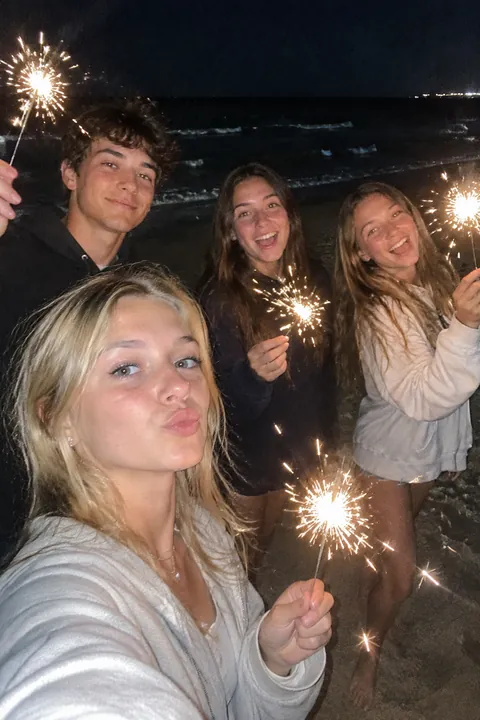
Portraits after dark
- Sparklers Check local rules first, light them away from faces and loose clothing, hold them at arm’s length and keep a bucket of water close. Shoot from a few steps back as friends wave them.
- Neon glow Stand a friend a step away from a neon sign so its color washes across their face. Tap the sign to set the exposure.
- String-light bokeh Hang string lights well behind your subject and switch to Portrait mode; the bulbs blur into soft circles.
- Lit by a screen Someone looking down at a phone or laptop in a dark room, the screen lighting only their face. Moody and easy.
- Passenger seat glow A friend in the passenger seat lit by the dashboard and passing streetlights. Only when you’re not the one driving.
- A silhouette in a doorway Someone standing in a lit doorway or window, shot from the dark outside. The frame becomes a shape.
- The Night mode selfie On supported models, Night mode works with the front camera too. Stand by one soft light, like a shop window.
- Glow sticks Glow sticks bent into bracelets and crowns in a dark backyard, faces lit green and pink.
City and street
- Light trails From a footbridge or a sidewalk above traffic, rest the iPhone on the railing and use the Long Exposure effect to turn headlights into streaks. Never step into the road for the shot.
- Streets after rain Wet pavement doubles every streetlight and sign. Hold the iPhone low near a reflection, and watch your footing; more in rainy day photo ideas.
- Lit windows An apartment block with a few windows glowing, shot from across the street. Each window is a tiny scene.
- The late-night counter A bright diner or food stall seen from the dark sidewalk, someone waiting for their order.
- The Ferris wheel Long Exposure turns a spinning ride into rings of light. Brace against a fence post.
- Fireworks over a skyline Frame a strip of rooftops at the bottom, brace your arms, and shoot when you hear the launch.
The sky
- The moon over something A small moon above a rooftop, steeple or tree reads better than a blurry, zoomed-in moon alone.
- Stars away from town On a clear night far from streetlights, set the iPhone on a tripod or a rock and let Night mode take a longer exposure. Go with a friend.
- Blue hour skyline In the short window after sunset, the sky turns deep blue while the city lights come on. It’s the richest sky of the night.
- The glowing tent A tent lit from inside by a lantern, shot from outside with the dark trees around it.
Make it move
Night shots are full of lights that should flicker. In Tada:
- Natural for the sparklers, the neon sign or the string lights: people blink, breathe and smile a little, and with no people in the frame, the lights that are already there move. It takes 20–40 seconds.
- Sun & Moon for a night portrait: a sleepy crescent moon or a smiling sun on your head, with tiny planets, orbit rings and stars around, drawn in brush-pen marker with white sticker borders. Give it about a minute.
- Stickers if you didn’t have the real thing: Vibes has fireworks, bokeh and sequins, and Things to hold has a sparkler. A set lands on you in about a second. Free.
Natural and Sun & Moon are AI tadas, made on Tada’s servers with OpenAI and xAI once you say yes. Privacy.
iPhone tips for night photos
- Night mode turns on automatically in low light. Hold still until the capture finishes, and if crosshairs appear, line them up.
- Rest the iPhone on a railing, a wall or a tripod. Apple notes a tripod gives even more detailed Night mode photos.
- Leave the flash off for city scenes; it lights only what’s close and flattens the rest.
- For Long Exposure, keep Live Photo on, then in Photos tap the Live Photo button near the top and choose Long Exposure. See long exposure on iPhone.
- Tap the brightest part of the scene, then drag the exposure down so neon and lamps don’t blow out.
Questions
How do I take good night photos with my iPhone?
Let Night mode do its work: hold still or rest the iPhone on something steady until the capture ends, turn off the flash, and tap a bright area to set focus. Blue hour gives the richest sky.
Why are my night photos blurry?
In the dark the camera needs a longer exposure, so any shake or movement blurs. Brace the iPhone, ask people to hold still for a second, and watch for the Night mode crosshairs.
How do I take sparkler photos?
Shoot from a few steps back with Live Photo on so you can pick a frame later, and try Long Exposure for trails. Light sparklers away from faces and keep water nearby.
Sources: iPhone User Guide: Take Night mode photos · Apple Support: Take and edit Live Photos · iPhone User Guide: Use iPhone camera tools to set up your shot · iPhone User Guide: Take portraits with your iPhone camera