Selfie poses and ideas, mirror selfies included
The quickest way to a better selfie is to hold the phone a little above eye level, turn your face slightly and give your hands something to do. Below are 21 ideas: poses for the front camera, places and props that make a selfie interesting, and mirror selfie ideas, with iPhone settings that help.
Selfie poses
- Chin down, eyes up Hold the phone slightly above eye level and lower your chin a little. It sharpens the jawline and opens up your eyes.
- The three-quarter turn Turn your face about a quarter away from the lens so one cheek sits closer. Try both sides; most people have a favorite.
- A hand near the face Tuck hair behind an ear, rest fingertips on your jaw or push a hand through your hair. Keep the fingers soft, not flat against your cheek.
- Looking away Glance out of a window or down at your coffee and take the shot before you look back. It reads as a candid even with the front camera.
- Half the face Let the frame cut through the middle of your face: one eye, half a smile, a sweater collar pulled up. Good when you don’t want the full picture.
- Lying down, hair spread Lie on a bed or in the grass, hold the phone straight above you and fan your hair out. Hold on tight so it doesn’t land on your nose.
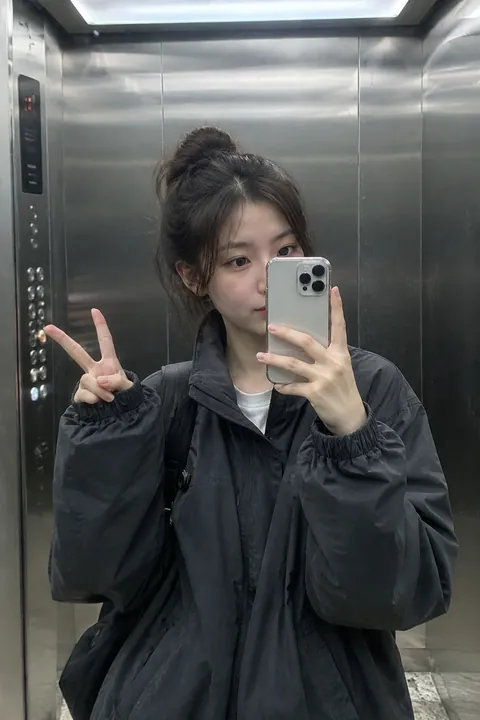
- Peace sign at the lens Bring your hand close to the camera and let it look huge in front of your face. The closer the hand, the funnier the scale.
- Over the shoulder Turn your back to the phone at arm’s length and look back over one shoulder. It shows off a hairstyle, an earring or the back of a jacket.
Selfie ideas
- Window light Face a window during the day and let the light hit you straight on. It’s the softest, most even light most homes have.
- Driver’s seat at golden hour Parked, with the low sun coming through the side window across your face. Sunglasses on the head, seat belt off.
- Stripes of shadow Stand by half-open blinds or under a leafy plant in the sun so stripes or leaf shapes fall across your face.
- Cheek to cheek with your pet Squish your face next to your dog’s or cat’s. Hold a treat above the phone so they look at the lens for a second.
- The 0.5 selfie Flip to the back camera, tap 0.5x and hold the phone close and above you. Feet look tiny and whatever you hold looks enormous. More in the 0.5 pic guide.
- Sunglasses reflection Get close so the beach, the city or your friends show up in your lenses. Tilt your head until the reflection is clear.
- Everyone squeezed in A group selfie works when the tallest friend holds the phone up high and everyone leans in. Tap the wider field-of-view button so no one gets cut off.
Mirror selfie ideas
- Elevator mirror Mirrored walls and even ceiling light, with a reflection of a reflection behind you. Wait for an empty car and shoot between floors.
- Fitting room outfit check Stand back so the whole outfit fits, phone at chest height. The tags-on, which-one-should-I-buy look is part of the charm.
- Full-length mirror at home Lean the mirror against a wall, step back and hold the phone at waist height pointed slightly up. Your legs look longer.
- Flash on, on purpose Turn the flash on and shoot straight into the mirror for a bright starburst over the phone. It hides the phone and gives a party-night look.
- Round mirror in a café Antique shops, cafés and hotel lobbies often have a round or gold-framed mirror. Frame yourself inside it like a portrait.
- Gym mirror after the workout Messy hair, water bottle, everyone else blurred in the background. Shoot it before you catch your breath.
Make it move
A selfie that moves makes a good Lock Screen or a message that says more than a still. In Tada:
- Breathe, in Make it Live, for a profile-picture selfie: you breathe softly in a seamless loop. It’s free and made on your phone. Then set it as a Live Photo wallpaper.
- The Face stickers pack for a plain selfie: freckles, glitter, star tears or fawn spots land on your face in about a second and keep moving in the Live Photo. Tap Shuffle for another set.
- 0.5 Pic, an AI look in Add effects, if you didn’t get the 0.5 shot: it re-shoots your selfie as if from close up and above with an ultra-wide lens, and you move. It looks like you but isn’t the same picture, and it works best with one person.
0.5 Pic uses 1 AI tada (you get 3 free) and takes about a minute. Tada asks first, since the photo is sent to OpenAI to redraw and xAI to make the motion (privacy).
iPhone settings for selfies
- To save the selfie the way you saw it on screen instead of flipped, go to Settings > Camera and turn on Mirror Front Camera.
- Press either volume button instead of tapping the screen. Your hand stays still and your arm doesn’t cast a shadow.
- For a blurred background, swipe to Portrait and tap the front-facing camera button. High-Key Light Mono gives a black-and-white portrait on a white background.
- Burst mode works on the front camera too: swipe the Shutter button to the left while you laugh or turn, then keep one frame.
Questions
How do you pose for a selfie?
Hold the phone a little above eye level, turn your face slightly to one side and lower your chin a touch. Then do something: laugh, look away, touch your hair.
How do you take a good mirror selfie?
Clean the mirror, stand where the light falls on you rather than behind you, and hold the phone at chest or waist height so it doesn’t cover your face.
Why do my selfies look flipped?
The front camera shows you a mirror image while you frame the shot, then saves it reversed. Turn on Mirror Front Camera in Settings, then Camera, to keep it the way you saw it.
Can I make a selfie into a Live Photo?
Yes. In Tada, tap Make it Live, pick the selfie and choose Breathe for a free, gentle loop. Tap Save and it’s a Live Photo in Photos.
Sources: iPhone User Guide: Take a selfie with your iPhone camera · Apple Support: Use Portrait mode on your iPhone · iPhone User Guide: Capture action shots with Burst mode · iPhone User Guide: iPhone camera basics