Senior picture ideas
The senior pictures people keep are the ones that look like the senior: their sport, their car, their dog, their spot. Here are 20 ideas in two groups, poses first, then props and places, all easy to shoot with an iPhone and a friend.
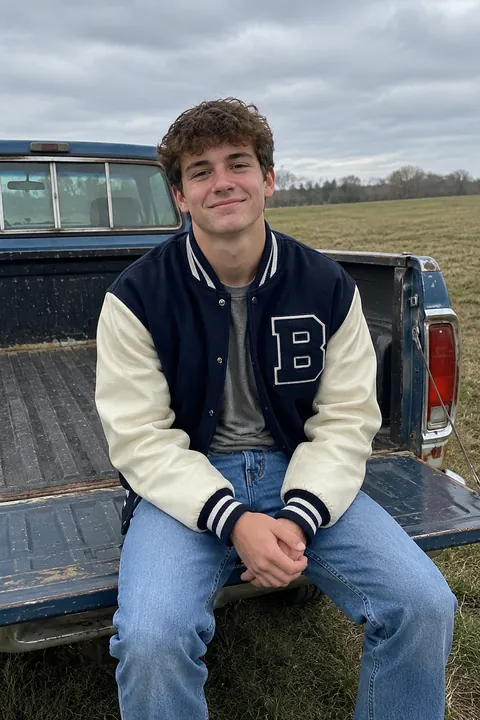
Poses
- Sitting on the steps, leaning in Sit a step or two up, elbows on knees, lean slightly toward the camera. It looks relaxed and puts the face closer than the body.
- The walk-past Walk across the frame and turn your head toward the camera on the third step. Shoot a burst and keep the one where your feet are mid-stride.
- Leaning on a wall, hands in pockets One shoulder on the wall, thumbs in pockets or hooked on a jacket. Shift your weight to the back foot so you don’t look stiff.
- The real laugh Have a friend stand behind the photographer and say something ridiculous. A real laugh beats any practiced smile.
- The hair flip or jacket toss Flip your hair or swing a jacket over your shoulder on a count of three. Burst catches the frame where it’s still in the air.
- Lying in the grass Lie on your back, hair spread out, and have the photographer stand over you and shoot straight down. Keep a strap on the phone.
- Soft hands near the face Rest a hand lightly at the jaw or in your hair, fingers relaxed. No fists, no flat palms.
- Back to back with your best friend Arms crossed, both looking at the camera, then both cracking up. Take the serious one and the broken one.
- On the hood or tailgate of your first car Sit on the hood, the tailgate or the open trunk, keys dangling from one finger. Park it with the sun behind you.
- Looking away Look past the camera at something in the distance, chin a little down. Two or three of these balance a gallery full of smiles.
Props and places
- Your letterman jacket or jersey Wear it, or hold it over your shoulder with your number facing the camera.
- Your sport, mid-action Shoot a free throw, a pitch or a kick on your home field in burst. Then a quiet one sitting on the bench with your gear.
- Your instrument Sit on the bleachers with your guitar, play a few notes at the piano in the music room, or rest drumsticks on your shoulder.
- Your dog Sit in the grass with the dog in your lap. Have someone hold a treat just above the lens so the dog looks at the camera too.
- The college sweatshirt Pull on the hoodie of the school you’re going to next, or hold your acceptance letter. Shoot the reveal in burst.
- The tools of your hobby A sketchbook, a film camera, a chef’s apron, a skateboard. One honest prop says more than three cute ones.
- Your locker or an empty hallway Ask the school first. Long hallways give clean lines that lead to you.
- The bleachers at golden hour Sit high in the stands in the hour before sunset, with the field glowing behind you.
- Tall grass or a wildflower field Stand in it up to your waist and walk slowly through it. Shoot from low so the grass softens the bottom of the frame.
- A mural or a painted wall downtown Pick one with a color that goes with your outfit and stand a few steps away from it so the wall blurs a little in Portrait mode.
Make your senior pictures move
For a portrait you love as it is, Natural in Make it Live adds small, candid motion: you blink, breathe, smile a little, and your hair and clothes move slightly while the camera stays still.
For the posts that come after, two AI looks redraw you and then make you move. 0.5 Pic re-shoots a normal portrait as a 0.5 pic, from close up and above. Manga Me turns it into a manga panel in one of six styles. Both work best on a photo of one person, and the result looks like you but isn’t the same picture, so keep your yearbook photo as it is.
Natural and the AI looks use 1 AI tada each (3 are free). They’re made on Tada’s servers with OpenAI and xAI, and Tada asks before the first one. Read more on the privacy page.
iPhone tips for senior pictures
- Use Portrait mode for close-ups and tap Depth to set how blurry the background gets.
- Shoot the hair flip, the jacket toss and the sports shots in burst: swipe the Shutter button to the left and lift to stop.
- Keep Live Photo on for the walk-past. Later you can tap Edit, then the Live Photo button, and choose the frame with the best stride as the key photo.
- No photographer? Set the Timer to 10 seconds from the Camera Controls button and lean the phone on a backpack.
- Face the light. Turn so the late sun is on your face or behind you, never straight overhead.
Questions
When should you take senior pictures?
Most seniors take them in the summer before senior year or early in the fall, when the weather and light are good. Check your yearbook deadline first and work back from it.
How many outfits should I bring for senior pictures?
Two to four is plenty: one dressy, one casual, and one that shows your sport or hobby. Change in the car so you don’t lose the light.
Can I take my own senior pictures with an iPhone?
Yes, for your own gallery and posts. Some schools require the yearbook portrait from a set studio or in a set format, so check that before you plan.
Where should I take senior pictures?
Somewhere that was part of your high school years: the field, the music room, your street, your favorite diner. A familiar place makes relaxed photos.
Sources: Apple Support: Take and edit Live Photos · Apple Support: Take Burst mode shots · Apple Support: Use iPhone camera tools · Apple Support: Take portraits with your iPhone camera