Wedding photo ideas
A wedding day gives you the same big moments everyone expects (the aisle, the rings, the first dance) and hundreds of small ones in between. Here are 24 ideas in the order the day happens, for a couple shooting their own small wedding, a friend helping out, or a guest catching the candids.
Getting ready and the ceremony
- The dress by the window Hang the dress or the suit in a window or a doorway and shoot it in the morning light before anyone puts it on.
- Rings, shoes and the invitation Lay them on a bed or a wooden table, a little apart. Shoot from directly above, then close on the rings.
- The last button Hands doing up the back of a dress, a tie, a cufflink. Shoot the hands, not the faces.
- A parent’s first look Stand behind the person getting married and shoot the parent’s face as they walk in and see them ready.
- Reading the letter If the couple swaps notes before the ceremony, shoot the reading from the side. Tears welcome.
- The first look One partner waits facing away, the other walks up and taps a shoulder. Stand where you can see the face that turns.
- Fixing the veil or the boutonniere A friend’s hands making the last fix. Small, close and full of nerves.
- Walking down the aisle Shoot from the end of a row, not from the middle of the aisle, zoomed to 2x or 3x. If there’s a hired photographer, give them the center.
- The face at the end of the aisle Turn around. The partner waiting at the front, seeing them for the first time, is often the better photo.
- The ring going on From the front row, zoom in on the hands at the ring exchange. Shoot a short burst; it happens fast.
- The kiss and the cheer Wide enough to get the guests on their feet behind the couple.
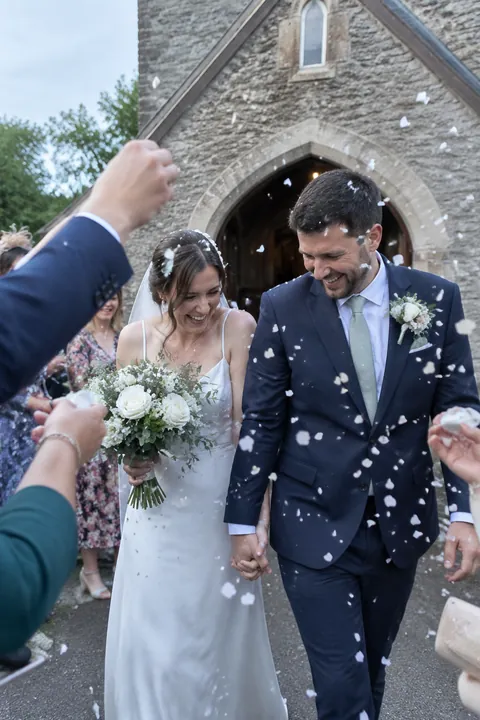
- The petal toss on the way out Stand a few rows ahead of the couple as they walk back up the aisle and shoot in burst as the petals fly.
Portraits and the reception
- The veil in the wind Let a breeze, or a friend, lift the veil behind the couple. Shoot from slightly low.
- Golden hour walk Slip out for ten minutes before sunset and walk hand in hand through a field or down a quiet road.
- A reflection A puddle, a pond or a big window. Shoot the couple upside down in it, then flip the photo.
- The wedding party coming at you Everyone walks toward the camera in a line, laughing, arms linked. More fun than a lineup.
- Watching the toasts Point the camera at the couple during the speeches, not the speaker. Their reactions are the story.
- Cake cutting Hands together on the knife, then the bit of frosting on someone’s nose.
- The first dance Shoot from the edge of the dance floor at 2x, string lights behind them. Then one wide with the whole room watching.
- Grandparents on the dance floor Often the sweetest dancing of the night. Get low and close.
- The flower girl and the ring bearer Kids on the dance floor in their wedding clothes, spinning. Burst and hope.
- Shoes off The heels and dress shoes kicked off at the side of the dance floor, a sign the party is working.
- Night portrait under the lights Step outside with the couple, stand them under string lights or a lantern, and keep the phone very still.
- The sparkler exit Stand at the far end of the sparkler tunnel and shoot in burst as the couple runs toward you.
Make your wedding photos move
Lively in Make it Live is made for the big moments: people laugh, turn their heads and wave, and hair, veils and dresses swing. The Soundtrack look in Add effects fits the first dance: drawn music notes, a little vinyl record and sound-wave squiggles around the couple, the notes bobbing to a beat. It’s a drawing, so there’s no sound.
For something free, the Vibes sticker pack has petals and confetti, and Things to hold has a bouquet. Lively and Soundtrack are AI tadas, made on Tada’s servers with OpenAI and xAI after you agree the first time (privacy). Planning the photos before the wedding? See our engagement photo ideas.
iPhone tips for wedding photos
- Use the 2x or 3x zoom from your seat instead of stepping into the aisle, and leave the flash off during the ceremony.
- Swipe the Shutter button to the left for a burst at the ring exchange, the petal toss and the sparkler exit.
- Use Portrait mode for rings, shoes and the bouquet; tap Depth to soften what’s behind them.
- Leave Live Photo on all day. When the kiss frame is a blink early, choose a better one later with Make Key Photo.
Questions
Can guests take photos during the wedding ceremony?
Only if the couple is happy with it. Some ask for an unplugged ceremony with phones away. If phones are fine, stay in your seat, turn the flash off and keep out of the hired photographer’s way.
What wedding photos should you not miss?
The getting-ready details, the first look or the walk down the aisle, the rings, the kiss, family groups, the first dance and the exit. A short list for a friend with a phone helps.
Can you take wedding photos with an iPhone?
Yes, especially for a small wedding or the candids. Use Portrait mode for details, burst for fast moments, and zoom instead of walking into the aisle.
Can I make a wedding photo move?
Yes. Open Tada, tap Make it Live, pick the photo and choose Lively or Natural, then tap Save. It goes to your Photos library as a Live Photo you can send in Messages.
Sources: Apple Support: Take and edit Live Photos · Apple Support: Take Burst mode shots · Apple Support: Take portraits with your iPhone camera