Snow and winter photo ideas
Snow gives you a clean, bright backdrop and things to throw, catch and build. Here are 20 snow and winter photo ideas, from snow angels to frozen soap bubbles, plus the iPhone settings that keep white snow from coming out gray.
In the snow
- Snow angel from above Stand over your subject on a step or a sturdy bench and shoot straight down while they sweep their arms and legs.
- Snowball mid-throw Stand off to the side of the thrower and shoot a burst. The frame with the snowball just leaving the glove is the one.
- Catching flakes on the tongue Shoot from below against a dark tree or a brick wall so the falling flakes show up.
- Snowflakes on a dark mitten Catch a few flakes on a dark glove or wool scarf and get as close as your camera will focus.
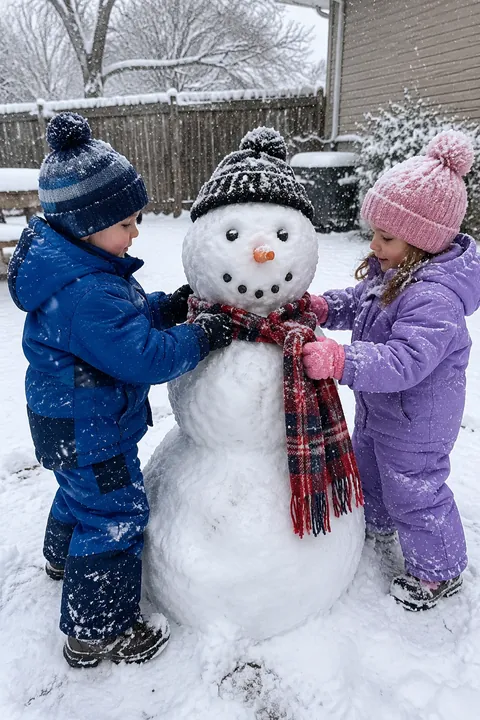
- Building the snowman Shoot the work, not just the result: rolling the big ball, lifting the head on, hunting for the carrot.
- The snowman’s portrait Crouch to the snowman’s eye level, give it a real scarf and hat, and let its builder peek out from behind.
- Sledding run Stand at the bottom of the hill, a few steps to the side of the track, and shoot a burst as the sled comes down.
- One line of footprints Shoot a single trail of footprints in fresh snow that leads to a person far away in a bright coat.
- Branch shake One friend shakes a snowy branch over another. Shoot from the side with burst.
Winter light and weather
- Snow under a streetlight At night, stand so the streetlight is behind the falling snow. The flakes light up against the dark sky.
- Frosted window Shoot through a frosted or fogged window with a face close behind the glass.
- Breath in the cold Put the low sun behind your subject and ask them to breathe out. Backlight makes the breath cloud show.
- Through the icicles Shoot through a row of icicles hanging from the roof, with your subject soft in the background.
- Frozen bubbles On a very cold, still day, blow soap bubbles and watch them frost over. Shoot close against a dark background.
- Blue hour in the snow Just after sunset the snow turns blue. A lit window or a string of lights in the frame warms it up.
Cozy indoors
- Soup after sledding Red cheeks over a steaming bowl of soup after a cold afternoon out, lit from the side by the window.
- Wet boots by the door Snowy boots, mittens drying on the radiator, a puddle on the mat. A whole snow day in one corner.
- Socks to the fire Shoot feet in wool socks pointed at the fireplace or wood stove from the couch.
- Watching it come down Kids pressed against the window watching it snow, shot from behind with the snowy yard beyond them.
- Puzzle by the window A half-done jigsaw on the table, snow falling outside, hands reaching for the next piece.
Make it move
In Tada, open a winter photo and try these:
- Natural in Make it Live: people blink and breathe, and hair and scarves move a little. In a photo with no people, it moves what’s already there, like steam off a bowl of soup or lights in a window, so the soup and blue-hour shots are good candidates.
- Breathe is free and made on your phone in about a second: a close portrait in a hat and scarf breathes softly in a seamless loop.
- Stickers: Hats & headbands has a beanie and a reindeer headband, Neck things has a scarf, and the Sweet & cozy pack (Pro) has a snowman and snowflakes. Tap Shuffle for a new set.
Natural uses 1 AI tada (3 are free); Tada asks before your first one and makes it with OpenAI and xAI (privacy). For tree and stocking shots, see Christmas photo ideas.
iPhone tips for snow photos
- Snow tricks the camera into making it gray. Tap your subject, then drag up next to the focus box to brighten until the snow looks white.
- For snowballs and sleds, swipe the Shutter button to the left to shoot a burst.
- At night, on iPhones with Night mode, it turns on by itself in low light. Brace the phone on a fence or a car roof for streetlight snow.
- Keep the phone in an inside pocket between shots. Cold drains the battery faster.
Questions
Why do my snow photos look gray?
The camera sets exposure for an average scene, so a frame full of white snow comes out darker than it looks. Tap your subject and drag up to brighten before you shoot.
What should I wear for snow pictures?
Solid, bright colors stand out against white: a red coat, a mustard beanie, a green scarf. All-white outfits disappear into the snow.
When is the best light for winter photos?
The sun stays low all day in winter, so midmorning and midafternoon both give long, soft light. Right after sunset, snow turns blue, which looks good with a lit window in the frame.
Sources: Apple Support: Use iPhone camera tools to set up your shot · Apple Support: Capture action shots with Burst mode on your iPhone camera · Apple Support: Take Night mode photos with your iPhone camera