Miniature me: turn yourself tiny
Tada’s Tiny You look re-shoots your photo with you a few inches tall, in the same place, next to things at their real size, and makes you move. Pick a photo, tap Tiny You, and save it as a Live Photo.
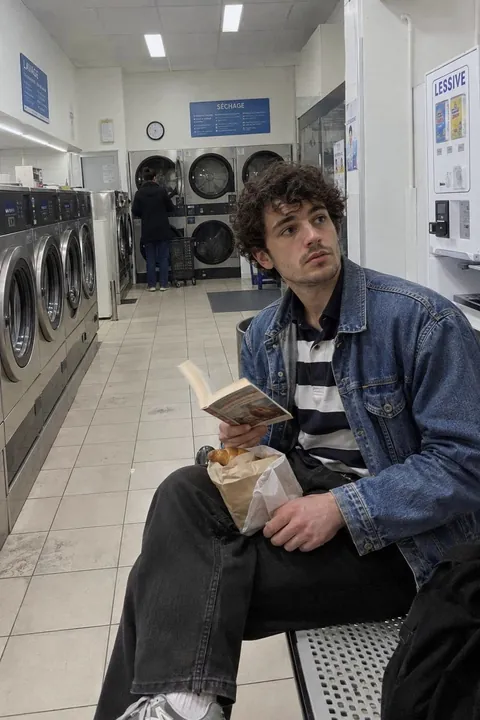
How to make a miniature you
- Open Tada, tap Add effects and pick a photo of you, on your own.
- In AI looks, choose Tiny You and tap Make it.
- In about a minute, tiny you is there, moving: swinging legs, looking down at a book, then up with a smile.
- Tap Save. It goes to Photos as a Live Photo.
What makes it look tiny
The things around you stay full size. In the example, the bread bag that sat beside him is now taller than he is, and the background blurs the way it does in close-up shots of small things. Photos with a bag, a cup or a book near you give tiny you something to sit next to.
The AI draws you again at a tiny size, so it looks like you but isn’t the same picture. Your photo is sent to our AI partners to make it; Tada asks before the first time. Tiny You uses 1 AI tada: you get 3 free, and Tada Pro gives you 30 a month (15 a week on the weekly plan). If an AI tada doesn’t work, you aren’t charged.
Questions
How do I make a miniature version of myself?
Open Tada, tap Add effects and pick a photo of you. In AI looks, choose Tiny You and tap Make it. AI re-shoots the photo with you a few inches tall in the same place, next to things at their real size, and makes you move.
Does Tiny You look like me?
It draws you again at a tiny size, so it looks like you but isn’t the same picture. It works best on a photo of one person.
Is Tiny You free?
Tiny You uses 1 AI tada. You get 3 free, and Tada Pro gives you 30 a month (15 a week on the weekly plan).